

Mastering AI Automation for LLM Success
Ten places AI automation lives in your business, and the three levels of trust that decide whether it works.
“LLM success” cuts two ways: using large language models to run parts of your business well, and being the business those models recommend when your customers ask. Same discipline, two directions. This is the map.
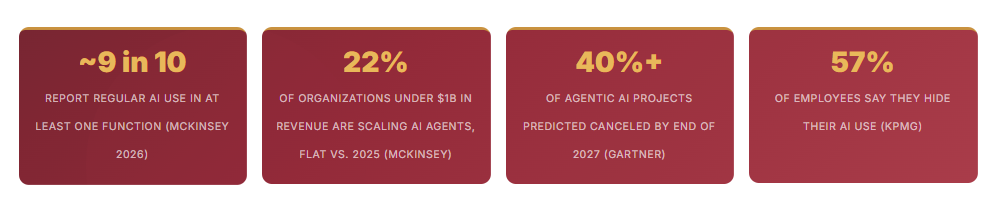
At a glance: ~9 in 10 respondents report regular AI use in at least one function (McKinsey 2026) · 22% of organizations under $1B in revenue are scaling AI agents, flat vs. 2025 (McKinsey) · 40%+ of agentic AI projects predicted canceled by end of 2027 (Gartner) · 57% of employees say they hide their AI use (KPMG)
What You’ll Find in This Article
- A case study about a 55-person firm that said yes to six AI tools in one quarter and couldn’t say what any of them were allowed to do
- Why nearly nine in ten companies use AI but fewer than half are scaling it across the enterprise, and why “behind” is the wrong word for where you are
- The Autonomy Ladder: three levels of trust (Assist, Workflow, Agent), and why every automation should be treated like a hire
- The Map: ten places AI automation lives in a business, in three territories, each defined, with a suggested starting level and the deep-dive article it will get
- How “LLM success” works in both directions: automating your work, and earning recommendations from the models your customers now ask
- A three-question method (Pain, Ruler, Risk) for choosing which area to automate first
- Six best practices, five little-known gems, and a direct next step
Every Department Head Brought Him One Tool
A 55-Person Accounting & Advisory Firm
In the early part of the year, the managing partner of an Accounting and Advisory Firm told every department head the same thing: bring me one AI automation this quarter. And that’s exactly what they did. Client service came back with an intake chatbot. Billing found an invoice-capture tool. Marketing signed up for a content generator. HR trialed a resume screener. IT added a meeting-notes bot. The managing partner picked a proposal drafter himself. By mid-year, the firm had six tools, six logins, and two that overlapped. Nobody was reckless. Everyone had done what was asked.
The trouble with it all showed up in a small way. A longtime client got a warm “just checking in” email from the marketing tool the same week billing’s reminders had flagged his account as past due. Two messages, two tones, and nobody had decided either one. When the managing partner asked what each tool was allowed to do without a person looking, he got six different answers and one shrug.
The fix wasn’t fewer tools. It was being on one page company-wide: ten areas of the business, which tools touched which, who owned each, and how much freedom each had been given. The overlapping tools merged. Client-facing email went back to “AI drafts, a person sends.” Invoice capture stayed, as a fixed workflow where a person approves anything that moves money. Nothing was allowed to decide on its own yet.
Every tool in that study worked. What the firm lacked was a map of where automation belonged, and a rule for how much trust each task had earned. That’s the whole subject of this article, and it’s why “mastering AI automation” has far less to do with tools than it sounds like.
You’re Not Behind. You’re Unmapped.
McKinsey’s 2026 State of AI survey, published August 25, 2026, and drawn from 1,719 respondents in 97 countries, found that nearly nine in ten respondents report regular AI use in at least one business function. Only 44% say AI is scaling across their enterprise, up from 38% a year earlier. In other words, most respondents’ organizations still haven’t reached enterprise scale, which means “everyone is ahead of me” is mostly an illusion.
Scale also depends heavily on company size. Among respondents from organizations with more than $1 billion in annual revenue, 40% report scaling AI agents, up from 27% a year ago. Among smaller organizations, the share stayed flat at 22%. If you run a business well under that threshold, many of the agent headlines you read describe companies with budgets and teams you don’t have.
Financial results lag the activity. McKinsey found that 37% of respondents attribute at least some profit (EBIT) impact to AI, about the same share as the year before. Only about 6% qualify as high performers, meaning they attribute at least 5% of EBIT to AI and describe its impact as significant. Nearly three-quarters of those high performers say they fundamentally redesigned workflows because of AI, compared with one-quarter of other respondents. They were also twice as likely to say senior leaders visibly back AI initiatives and that their organizations have defined processes to measure results.
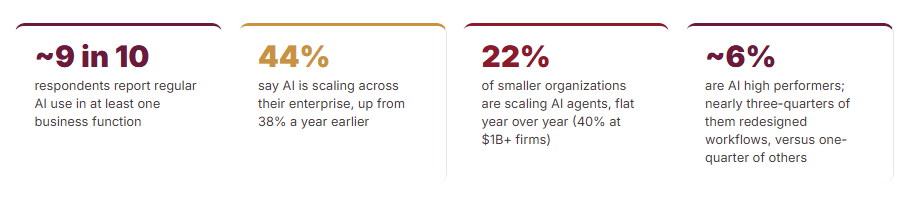
~9 in 10 respondents report regular AI use in at least one business function. 44% say AI is scaling across their enterprise, up from 38% a year earlier. 22% of smaller organizations are scaling AI agents, flat year over year (40% at $1B+ firms). ~6% are AI high performers; nearly three-quarters of them redesigned workflows, versus one-quarter of others.
The reading that matters: access to AI is no longer the scarce thing. What separates the roughly 6% from everyone else is how they deploy it: redesigned workflows, visible leadership backing, and a way to measure results. Knowing where automation belongs, in what order, and how much freedom each piece gets is a mapping problem, and that is far more fixable than a technology problem.
Treat Every Automation Like a Hire
Here’s what all businesses. large and small, can utilize in their company’s mastering of AI. Before you hire anyone, you write a job description, decide who supervises them, give them a probation period, and review their work. Almost nobody does any of that for an automation, even though an automation can send emails to customers, move money, and change schedules. Treating each automation as a hire, with a defined job, an owner, and a review date, is the simplest governance habit a business can adopt.
It also gives you a vocabulary. Anthropic’s engineering guidance on building with large language models separates workflows, where the steps are fixed in advance, from agents, where the model decides its own steps. Their advice is to find the simplest solution that works and add complexity only when it’s needed, and they note that this might mean not building an agentic system at all. They also warn that agents bring higher costs and the potential for compounding errors, and that using one requires some level of trust in its decision-making. In business terms, that gives you three levels of trust.
The overselling is measurable. In June 2025, Gartner predicted that over 40% of agentic AI projects will be canceled by the end of 2027, citing escalating costs, unclear business value, and inadequate risk controls. Gartner also says many use cases pitched as agentic today don’t require an agentic approach, and it estimates that only about 130 of the thousands of agentic AI vendors are real. Its practical advice lines up with the ladder: use agents when decisions are needed, automation for routine workflows, and assistants for simple retrieval. A good working rule of our own: start every automation one level lower than you think it deserves, and promote it on evidence.

In the Age of AI
You Gain the Advantage over Those Who Don't Step Up
The Map: Ten Places AI Automation Lives in Your Business
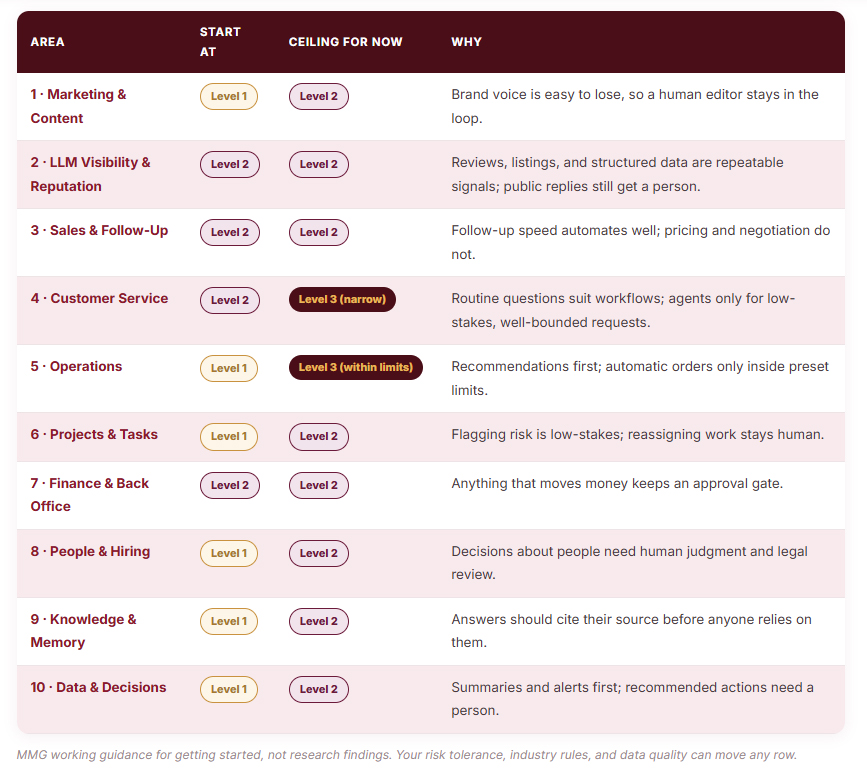
Most owners can name two or three places AI could help, usually marketing and customer service, because those are the ones vendors talk about. A business actually has ten, grouped into three territories: the work that wins and keeps customers, the work that delivers, and the work that helps you know and decide. Each area below gets a definition, where large language models fit, a suggested starting level, and the title of the deep-dive article it will receive.
Two Kinds of LLM Success
Nine of the ten areas use language models inside your business: they speed up work you already do. Area 2 is different because it faces outward. BrightLocal’s 2026 Local Consumer Review Survey, which polled 1,002 US adults, found that 45% of consumers had used AI tools such as ChatGPT or Google’s AI Mode to get local business recommendations in the past year, up from 6% in its 2025 survey. BrightLocal reports that AI is now the third most-used tool for local business recommendations, behind only Google and Facebook.
Better yet, like rich cream on top of a piece of pie, is that they have already done their research, figured out what would be best for them to buy, and because your company and brand are included in the conversation, or cited as an authority in the space, or even better yet, are the recommended choice of that AI on that topic or subject matter, they click over to your website ready to buy and be your client.
The practical consequence is that a growing share of your customers meet a language model’s answer about your business before they meet your website. BrightLocal notes that these answers can draw on reviews, local directories, business websites, social media, and other third-party sources, depending on the tool and the prompt. Keeping that picture current and consistent is repetitive, rule-based work, which makes it unusually well suited to automation. Reviews still carry weight on the human side, too: 97% of AI users in the survey said they sometimes double-check AI recommendations against real reviews.
If you want to see what the models say about you today, our AI Visibility Audit tests every prompt across ChatGPT, Gemini, Claude, Grok, and Perplexity, and our guide to every AI crawler worth optimizing for covers the technical side.
Where to Start: Pain, Ruler, Risk
Ten areas is too many to start at once, and nobody should try. A simple three-question score picks the first one. Rate each area from 1 to 5 on Pain, Ruler, and Risk, then start where Pain and Ruler are high, and Risk is low. It’s our own working method, and it takes about an hour with the right people in the room.
- Pain: How many hours or dollars does this area cost us each month?
- Ruler: Do we already measure it, in cost per unit, response time, or days to collect?
- Risk: If the automation is wrong, how bad, how visible, and how reversible is the damage?
The Ruler question matters more than it looks. An area you already measure gives you an undeniable before-and-after, which is the same discipline covered in our guide to which AI KPIs to actually track. An area with no measurement can still be automated, but you won’t be able to prove it worked, and unproven automation is the first thing cut in a budget review.
6 Best Practices for Mastering AI Automation
Little-Known Gems
Bottom Line: Let’s Draw Your Map
You don’t need a company-wide transformation to begin. You need one honest conversation about which of the ten areas costs you the most, which one you can already measure, and how much freedom each automation has actually earned.
MediaBus Marketing Group helps business owners and executives map where AI automation belongs…
Choose a sensible first area, and build in the ownership and review habits that keep it working.
Tell us where you are today, and we’ll help you see what comes first.
📞 · Contact Us Using the Form Below · ✉
Marketing Automation FAQs
Q1: What does “LLM success” actually mean for a business?
It has two meanings, and both matter. Inside the business, it means using large language models to run parts of your operation well: drafting, summarizing, sorting, answering, and flagging. Outside the business, it means being the company that models like ChatGPT, Gemini, and Perplexity recommend when customers ask who to call or trust. BrightLocal’s 2026 survey found 45% of consumers had used AI tools for local business recommendations in the past year, so the outward-facing meaning now matters to many local and service businesses.
Q2: Where should a small or mid-size business start with AI automation?
Start with the area that scores highest on Pain and Ruler and lowest on Risk. Pain means the hours or dollars the area costs you monthly. Ruler means whether you already measure it, such as cost per unit, response time, or days to collect. Risk means how damaging and visible an error would be. For many businesses, this points to an operations, back-office, or follow-up task rather than a flashy customer-facing project, because those areas already have numbers you can use to prove the result.
Q3: What’s the difference between an assistant, a workflow, and an AI agent?
They are three levels of autonomy. An assistant (Level 1) drafts or suggests, and a person decides and acts. A workflow (Level 2) follows steps fixed in advance, with the AI handling judgment inside a step and people reviewing exceptions. An agent (Level 3) chooses its own steps and tools toward a goal within limits you set, and people review outcomes. Anthropic’s guidance draws the workflow-versus-agent line the same way and recommends the simplest approach that works.
Q4: Do we need AI agents at all?
Often not from the onset. Gartner says many use cases positioned as agentic today don’t require an agentic implementation, and in June 2025 it predicted that more than 40% of agentic AI projects will be canceled by the end of 2027 because of cost, unclear value, or weak risk controls. Anthropic’s own advice is to find the simplest solution that works, which may mean no agent at all. A fixed workflow with a person reviewing exceptions solves a large share of real business problems with less cost and less risk. Contact Us today here to find out if your company needs Agents or not.
Q5: How do we keep automation from creating new risks?
Treat each automation like a hire. Write a short job description covering its scope, inputs, what it must hand to a human, its owner, and its success measure. Start it a level lower than you think it needs, review it after about 30 days, and promote it only on evidence. Set a company AI policy early too: KPMG’s 2025 study found only 40% of employees say their workplace has one, while 57% admit hiding their AI use. Clear rules and clear owners prevent most problems before they start.
Action Items:
Sources Cited in This Article
McKinsey Global Survey, “The state of AI in 2026: On the road to ROI” (August 25, 2026; 1,719 respondents in 97 nations; fielded May 4 to June 8, 2026) · Gartner press release, “Gartner Predicts Over 40% of Agentic AI Projects Will Be Canceled by End of 2027,” June 25, 2025 · Anthropic Engineering, “Building Effective Agents,” December 19, 2024 (Anthropic notes that much of the tooling it describes has changed since; the simplicity guidance cited here is the post’s central advice) · KPMG and University of Melbourne, “Trust, Attitudes and Use of Artificial Intelligence: A Global Study 2025” (more than 48,000 respondents, 47 countries; fieldwork November 2024 to January 2025) · BrightLocal Local Consumer Review Survey 2026 (1,002 US adults) and its AI-focused report, March 2026 · McKinsey, “Succeeding in the AI supply-chain revolution,” April 30, 2021 · Asana Anatomy of Work Index (survey of more than 10,000 knowledge workers; Asana’s pages do not date the edition).
SHARE THIS STORY ANYWHERE YOU LIKE
SHARE THIS STORY ANYWHERE

Mastering AI Automations for LLM Visibility and Reputation
Mastering AI Automation for LLM Visibility and Reputation Your AI reputation isn't a ranking. It's a rate. Ask [...]

Mastering AI Automation for Marketing and Content
Mastering AI Automation for Marketing and Content AI automated the typing. It didn't automate the knowing. Among B2B [...]

Mastering AI Automation for LLM Success
Mastering AI Automation for LLM Success Ten places AI automation lives in your business, and the three levels [...]