

AI Crawlers in 2026 – Every Bot You Should Optimize For
Every Bot. Every Configuration. The Exact Setup That Opens Your Site to AI Citations and Closes the Door on the Bots That Just Take.
WHAT YOU’LL FIND IN THIS ARTICLE
There are more than fifteen distinct AI crawlers visiting small business websites right now (and most business owners cannot name a single one) do not know which ones build AI citations versus which ones just harvest data with nothing returned, and have no idea whether their current configuration is attracting or blocking the ones that matter most. This article ends all of that. Here is what is inside:
- The complete AI crawler reference table — every major bot, what it does, who sends it, whether to allow or block it, and whether it generates real traffic
- The critical distinction — training crawlers versus search crawlers versus user-action crawlers, and why treating them the same is the most expensive mistake in AI visibility
- The Cloudflare default problem — how a security setting may be silently blocking your AI citations right now
- Two pathways to attracting AI crawlers — Attraction (passive) and Submission (active), with the exact steps for each
- The IndexNow protocol — how to get your content into ChatGPT’s search index in hours, not days
- The master robots.txt configuration — copy, paste, deploy
- How to monitor your brand in AI responses — the free method and the tools that automate it
THE TEST THAT REVEALS EVERYTHING
Open ChatGPT right now. Type: “Who are the best [your service category] providers in [your market]?”
Is your business named?
Do the same in Perplexity. Gemini. Claude.
If you are not appearing — or appearing less than your competitors — the most likely explanation is not inferior work, a bad website, or broken SEO.
The most likely explanation is that the bots responsible for building those AI recommendations are blocked from your site, often by a configuration you never knowingly set.
Training the LLMs via GPTBots now drives nearly 80% of AI bot activity on the web. But the user-action category grew 15 times year-over-year into Q1 2026. As AI assistants increasingly browse the web on behalf of users, this category will matter more.
These bots are visiting your website. The question is what they find when they arrive — and whether your setup gives them what they need to cite you, or sends them away empty-handed.
The merchant who hangs no lantern in the window on a dark night does not lack quality within the shop. They lack only the signal that tells those passing by that something inside is worth finding.
This article is your lantern guide. Every bot. Every configuration. Every action.
WHY THIS IS THE MOST IMPORTANT TECHNICAL DECISION IN YOUR AI PROGRAM
The entire AI visibility program this series has documented — the content architecture, the third-party mentions, the press releases, the entity consistency, the FAQ libraries — is built on a foundation that can be completely undermined by a single misconfiguration in a text file at the root of your website.
Your robots.txt file.
The businesses that understand the crawler ecosystem — that know OAI-SearchBot and GPTBot are fundamentally different entities doing fundamentally different jobs — are the businesses that can make strategic decisions about exactly which bots to welcome and which to block. The businesses that do not are either blocking their own AI citations or giving away their content to training datasets that generate no reciprocal benefit.
The difference between those two outcomes is ten minutes of configuration work.
Let us begin with the bots themselves.
THE COMPLETE AI CRAWLER REFERENCE
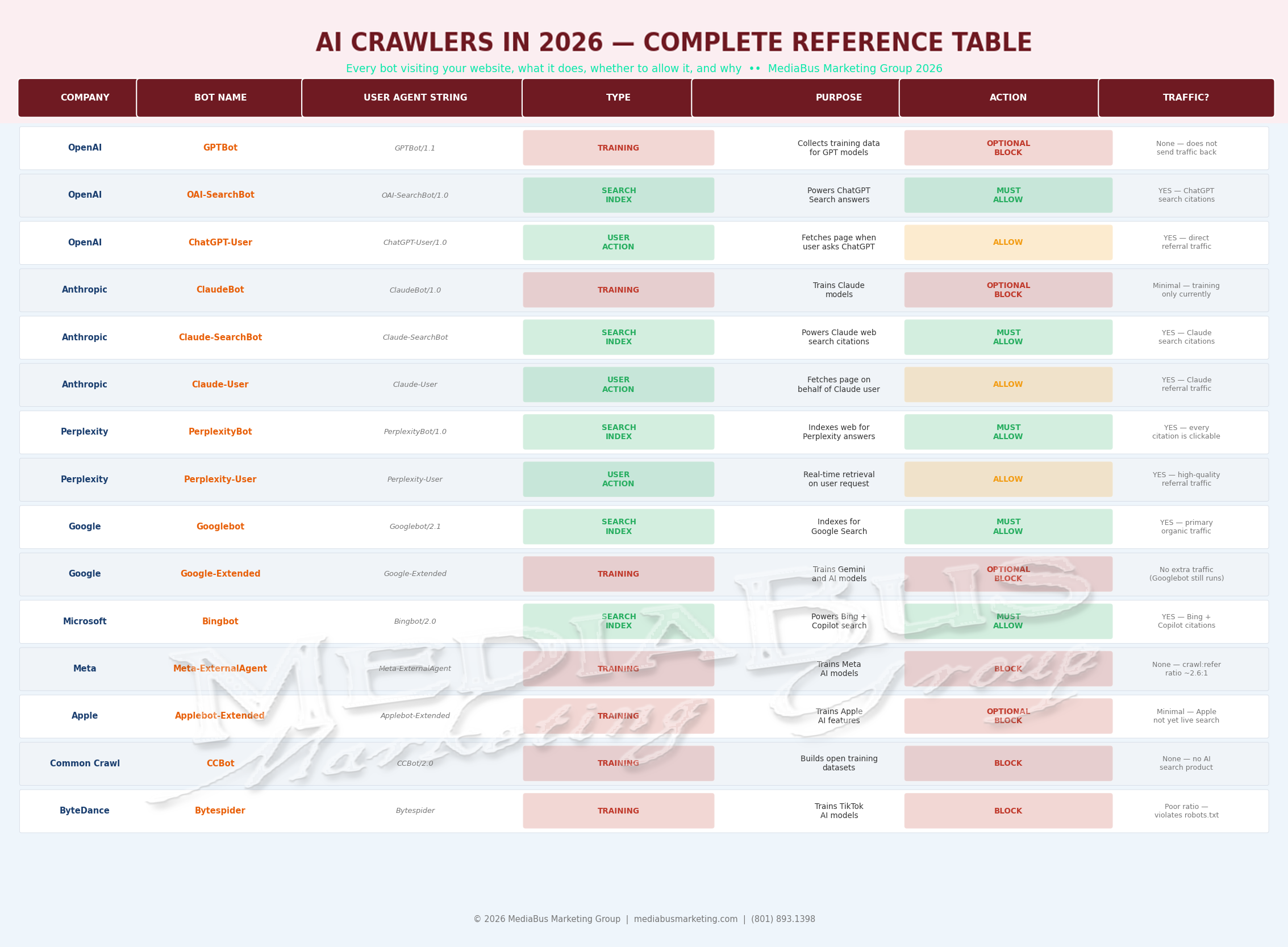
In the Age of AI
You Gain the Advantage over Those Who Don't Step Up
TWO PATHWAYS TO ATTRACTING AI CRAWLERS
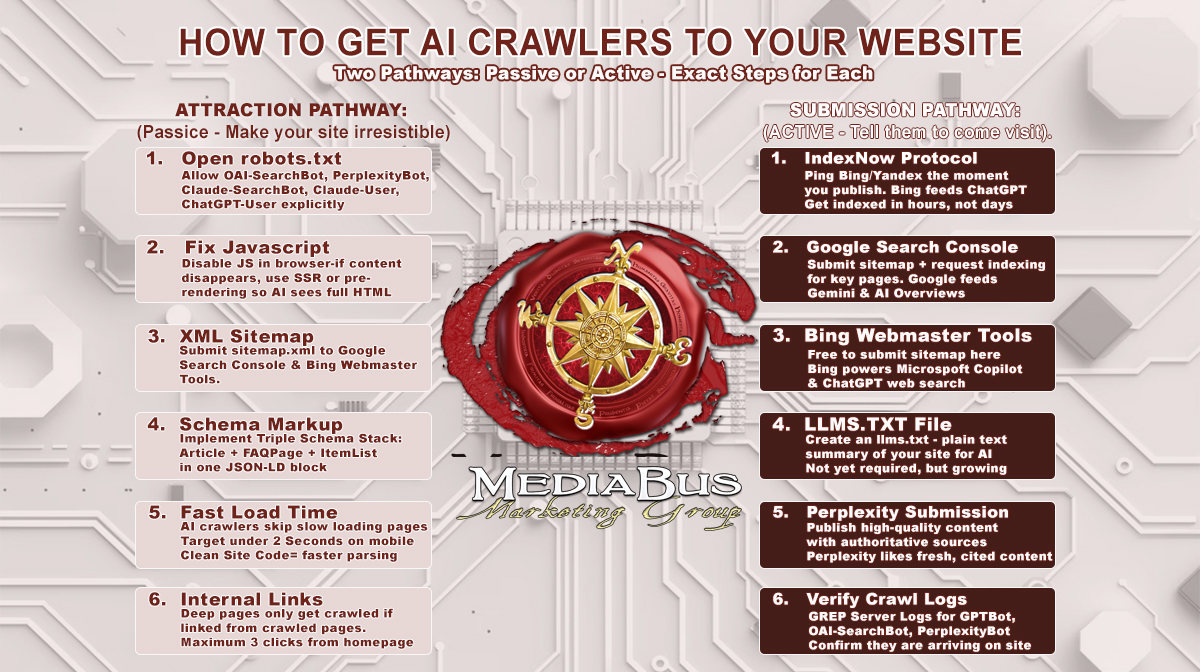
Left panel: Attraction Pathway (six passive technical steps). Right panel: Submission Pathway (six active notification steps). Execute both simultaneously.
ATTRACTION PATHWAY — Make Your Site Technically Irresistible
Step 1 — Open Your robots.txt (Do This Today)
Check yourdomain.com/robots.txt. If OAI-SearchBot, PerplexityBot, Claude-SearchBot, Claude-User, or ChatGPT-User appear in Disallow directives, your AI citation bots are blocked.
More urgently: Cloudflare recently changed its default configuration to block AI bots. If you use Cloudflare, your AI bot traffic may have been automatically shut off. Check whether you are using the service, then check Cloudflare > Security > Bots. This single check may restore months of AI crawler access you have been unknowingly blocking.
Step 2 — Fix the JavaScript Rendering Problem
If your pages load content dynamically through API calls or React components, AI crawlers see a blank page. Test by disabling JavaScript in your browser and reloading key pages. Whatever remains visible is what AI sees. If critical content disappears, you have a rendering problem that blocks citation regardless of content quality.
The fix: Server-Side Rendering. For standard WordPress themes — typically not an issue. For Webflow, React, or headless CMS builds — verify this immediately.
Step 3 — Submit Your XML Sitemap Everywhere
Submit your sitemap to every major search platform. In 2026, that means Google Search Console and Bing Webmaster Tools. Bing powers ChatGPT search — submitting to Bing is a direct ChatGPT visibility action.
Step 4 — Implement Triple Schema Stack
Pages using three or more schema types show approximately 13% higher likelihood of being cited by AI systems. Article + FAQPage + ItemList in one JSON-LD block. Every key page. Non-negotiable.
Step 5 — Page Load Under Two Seconds
AI crawlers skip slow pages. Test with Google PageSpeed Insights. Fix what slows you down.
Step 6 — Internal Links to Every Key Page
Every important page should be reachable within three to four clicks from the homepage. AI crawlers follow the same link paths as Googlebot — unlinked deep pages are invisible to both.
SUBMISSION PATHWAY — Tell AI Search Engines You Exist
Step 1 — IndexNow Protocol
IndexNow is an open protocol developed by Microsoft that allows websites to instantly notify participating search engines the moment content goes live — instead of waiting for discovery.
Bing Webmaster Tools pioneered IndexNow. Bing powers search for ChatGPT — making Bing indexing increasingly important for AI visibility.
For WordPress: install the free IndexNow plugin, connect to Bing Webmaster Tools. Every publish automatically pings Bing, which feeds ChatGPT search indexing within hours.
Step 2 — Google Search Console
Submit your sitemap. Use URL Inspection to request indexing for priority pages. Google feeds Gemini and AI Overviews.
Step 3 — Bing Webmaster Tools
Free. Five minutes. Submit the sitemap at bing.com/webmasters. Direct line to ChatGPT search index and Microsoft Copilot.
Step 4 — Create an llms.txt File
Think of llms.txt as writing the script for how you want AI to talk about your brand. Keep it concise. Update quarterly. Include links to your most authoritative pages.
Create yourdomain.com/llms.txt — plain text, summarizing your business, services, and links to key content. Fifteen minutes. Growing adoption.
Step 5 — Content Quality for Real-Time Retrieval
Perplexity crawls the web in real time. Fresh, cited, authoritative content — structured with question-format headings and direct answer paragraphs — gets prioritized in Perplexity’s retrieval. Publish consistently. Update with timestamps.
Step 6 — Verify Crawl Logs Monthly
grep -Ei "gptbot|oai-searchbot|chatgpt-user|claudebot|claude-searchbot|perplexitybot|bingbot" access.log
```

OpenAI publishes verified IP ranges for GPTBot at openai.com/gptbot.json and OAI-SearchBot at openai.com/searchbot.json.  Cross-reference to confirm legitimate crawler visits versus spoofed agents.

---

## THE MASTER robots.txt CONFIGURATION

**[INSERT GRAPHIC 3: The Master robots.txt Configuration for AI Visibility]**

*Graphic 3 — Complete, copy-pasteable robots.txt with color-coded sections: Always Allow (Googlebot, bingbot), Allow AI Search Bots (OAI-SearchBot, ChatGPT-User, PerplexityBot, Perplexity-User, Claude-SearchBot, Claude-User), Optional Block Training Crawlers (GPTBot, ClaudeBot, Google-Extended, Meta-ExternalAgent, CCBot, Bytespider). Right panel: four key insight boxes.*

---

Copy this. Customize the sitemap URL. Deploy:
```
# === ALWAYS ALLOW: Traditional Search ===
User-agent: Googlebot
Allow: /

User-agent: bingbot
Allow: /

# === ALLOW: AI Search & User-Action Crawlers ===
# These power your AI citations. Blocking = invisible.

User-agent: OAI-SearchBot
Allow: /

User-agent: ChatGPT-User
Allow: /

User-agent: PerplexityBot
Allow: /

User-agent: Perplexity-User
Allow: /

User-agent: Claude-SearchBot
Allow: /

User-agent: Claude-User
Allow: /

# === OPTIONAL BLOCK: Training Crawlers ===
# No citation benefit. Consider allowing GPTBot
# access to evergreen pages for long-term model knowledge.

User-agent: GPTBot
Disallow: /

User-agent: ClaudeBot
Disallow: /

User-agent: Google-Extended
Disallow: /

User-agent: Meta-ExternalAgent
Disallow: /

User-agent: CCBot
Disallow: /

User-agent: Bytespider
Disallow: /

User-agent: Applebot-Extended
Disallow: /

Sitemap: https://yourdomain.com/sitemap.xml
```

**The nuance on GPTBot:** We recommend allowing GPTBot to access at least core, evergreen information about your brand and services to maximize your presence in ChatGPT answers. Blocking it entirely means your business may never enter ChatGPT's foundational knowledge at all.

The pragmatic approach: allow GPTBot on your homepage, about page, and key service pages. Block it on time-sensitive content and proprietary material. Add this instead:
```
User-agent: GPTBot
Allow: /
Disallow: /blog/
Disallow: /private/
Review your robots.txt quarterly. The AI industry launches new crawlers regularly. When a major new platform launches, add its crawler within the first week.
Monitoring Your Brand in AI Responses
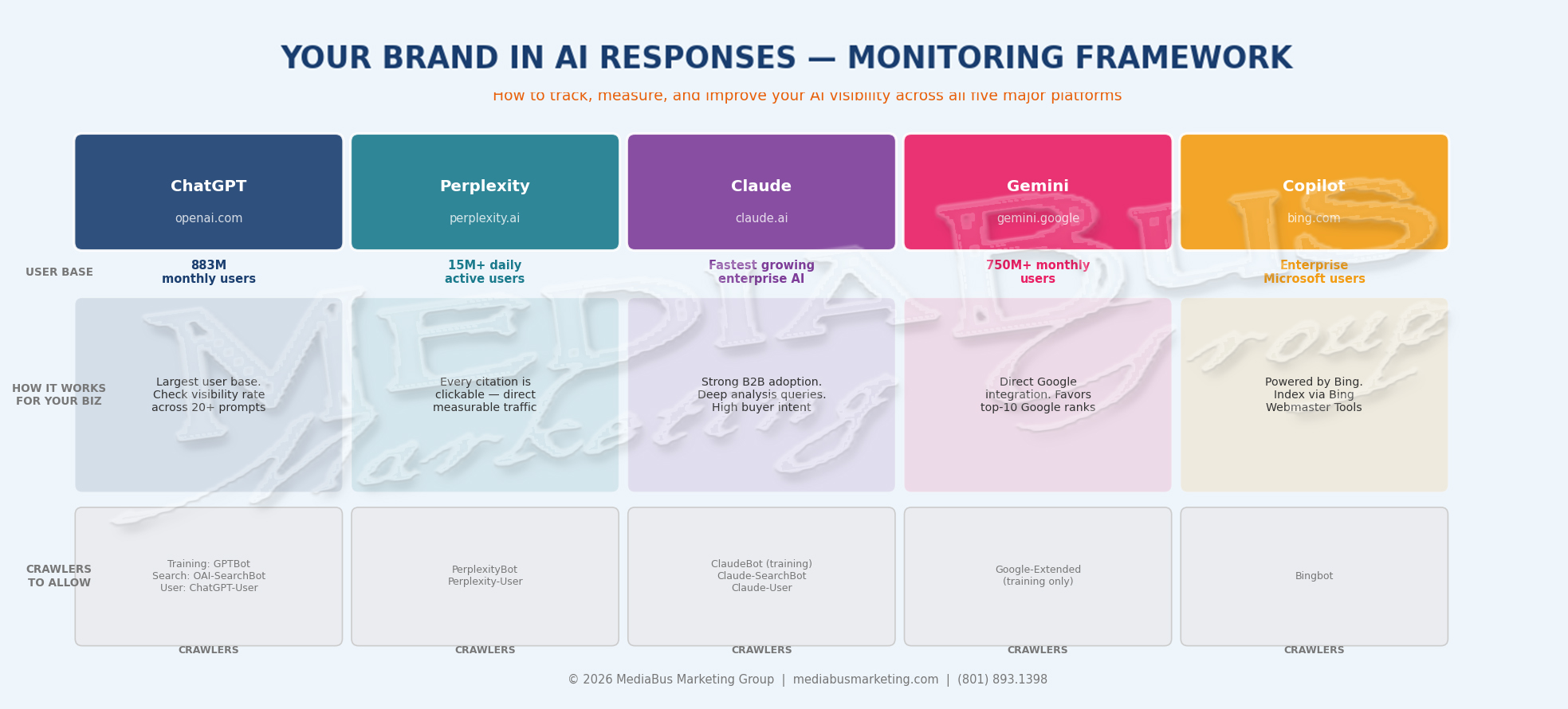
Platform monitoring matrix showing user scale, crawler names, and monitoring approach for ChatGPT, Perplexity, Claude, Gemini, and Copilot. Bottom section: five monitoring tools from free manual audit through paid platforms.
THE ONLY METRIC THAT MATTERS: VISIBILITY RATE
There is less than a 1% chance that ChatGPT returns the same list of brand recommendations twice for the same prompt. The same list in the same order appears less than 0.1% of the time. Any tool claiming to give you a ranking position in AI answers is measuring noise.
The metric that works: VISIBILITY RATE — what percentage of relevant prompts mention your brand, measured across enough volume to be statistically meaningful.
In tight categories like SaaS cloud computing providers, top brands appeared in 55-77% of responses regardless of how prompts were phrased. Track visibility rate, not rank. A 40% visibility rate across 200 prompt runs is meaningful data. Being ranked number two in a single ChatGPT response means nothing
THE FREE MANUAL METHOD
Run these three prompts across all five platforms monthly. Identical prompts every month — so changes reflect performance, not variation.
Prompt 1 — Category Discovery: “What are the best [your service category] businesses in [your region]?”
Prompt 2 — Direct Brand Query: “Tell me about [your business name]. What do they do and are they worth considering?”
Prompt 3 — Competitive Comparison: “Compare [your business] to [your primary competitor] for [your primary service]. Which would you recommend?”
Document every response. Calculate the visibility rate. Track month over month. This is your Brand Visibility Score — the leading indicator your entire AI program is designed to move.
THE MORE AUTOMATED MONITORING METHODS
We at MediaBus Marketing offer you a paid service on a monthly basis to check your progress in gaining the Visibility you want on the LLMs you are targeting to gain inclusions, citations, and recommendations within. We track and report on the major AI platforms, including ChatGPT, Claude, Gemini, Perplexity, Google AI Overviews, Copilot, and Grok, with monthly updates and real-time alerts.
CLICK HERE TO SET UP Your Benchmark AI Visibility Audit Today
The free measurement floor — GA4 AI Traffic Channel:
Perplexity is the exception where every citation is clickable — Perplexity referral traffic appears cleanly in GA4 under Acquisition > Referral filtered to perplexity.ai. For ChatGPT, only about 20% of brand recommendations include clickable links — the other 80% are invisible to GA4.
Create a custom channel grouping in GA4 capturing referral sessions from chatgpt.com, perplexity.ai, gemini.google.com, claude.ai, and grok.com. This gives you the measurable floor of direct AI-referred revenue.
THE IMPLEMENTATION SEQUENCE
Sequence matters. Do not skip ahead.
Week 1 — Emergency Configuration (highest leverage):
- Check robots.txt — identify blocked AI search crawlers
- Check Cloudflare — verify AI bots are not blocked by default
- Deploy the master robots.txt configuration
- Verify OAI-SearchBot and PerplexityBot in server logs within 48 hours
Week 2 — Submission Setup:
- Create an account at Bing Webmaster Tools — submit sitemap
- Install and configure IndexNow on your CMS
- Create the llms.txt file
- Test pages with JavaScript disabled
Week 3 — Content Architecture:
- Implement Triple Schema Stack on all key pages
- Apply the Island Test to the top five articles
- Add “Last Updated” timestamps to all key content
- Build an FAQ library with FAQPage schema
Week 4 — Monitoring Baseline:
- Run a three-prompt baseline audit across all five platforms
- OR get your AI Visibility Audit Here and set up Monthly Monitoring
- Calculate initial Brand Visibility Score
- Set up GA4 AI Traffic Channel
- We can set a monthly calendar reminder for subsequent audits

THE BOTTOM LINE
The businesses that understand this ecosystem are building AI visibility advantages that compound every month. The businesses that do not are producing excellent content and wondering why the AI never names them.
The fix is a text file. Ten minutes of deliberate configuration.
The crawl-to-refer ratio tells the whole story. GPTBot: 1,255 pages crawled per visitor sent back. ClaudeBot: 20,583:1. PerplexityBot: the best ratio in the category, where every citation is a clickable link. Block the ones with terrible ratios. Welcome the ones that cite you.
The robots.txt master configuration above is the exact code. The IndexNow setup is free. The Bing Webmaster Tools submission takes five minutes. The GA4 AI Traffic Channel takes ten minutes to configure. The monthly prompt audit takes thirty minutes.
Everything blocking your AI visibility is solvable. Most of it is solvable this week.
There is a path well-worn that leads to the old market, and those who walk it daily will always find what they have found before. There is a newer path, less traveled, that leads to where the advisors now gather and where the most sought-after merchants are being named. The lantern that guides the foot knows no preference for old roads or new. It simply shines wherever you choose to place it.
Place your lantern onward on the new path.
At MediaBus Marketing Group, we audit every client’s AI crawler configuration as the first step in every engagement — because no amount of content excellence reaches buyers who are asking AI for recommendations if the technical infrastructure is blocking the bots that deliver those recommendations.
Because your success is exactly how we measure ours.
Let us run a complete AI Visibility audit of your website. Don’t hesitate — contact us today by filling out the form below
AI Crawlers FAQs
FAQ 1 — What is the difference between an AI training crawler and an AI search crawler, and why does it matter?
AI training crawlers and AI search crawlers are fundamentally different bots doing fundamentally different jobs — and the decision to allow or block each depends entirely on understanding that difference.
AI training crawlers — GPTBot (OpenAI), ClaudeBot (Anthropic), Google-Extended (Google), Meta-ExternalAgent (Meta), CCBot (Common Crawl) — collect your content to improve AI model capabilities. They do not send meaningful traffic back. GPTBot’s crawl-to-refer ratio is 1,255:1. ClaudeBot’s is 20,583:1. The benefit of allowing training crawlers is that your content may contribute to the foundational knowledge AI draws from — but with a 6-12 month delay before any effect appears in responses, and no guarantee any specific fact is retained.
AI search crawlers — OAI-SearchBot (OpenAI), Claude-SearchBot (Anthropic), PerplexityBot (Perplexity), Bingbot (Microsoft) — build the real-time retrieval indexes that power AI search answers. OpenAI explicitly states that sites blocking OAI-SearchBot will not appear in ChatGPT search answers. PerplexityBot is the only major AI search crawler where every citation is a clickable link, generating measurable GA4 referral traffic. Block these and you are invisible in AI search.
The critical implication: GPTBot and OAI-SearchBot are completely separate bots operated by the same company. You can block GPTBot to prevent your content from entering OpenAI’s training datasets while simultaneously allowing OAI-SearchBot to maintain your ChatGPT search visibility. Most businesses that block all OpenAI crawlers for content protection reasons do not realize they have simultaneously eliminated their ChatGPT search citation visibility.
FAQ 2 — How do I check if my website is currently blocking AI crawlers — and what is the most common mistake?
The check takes thirty seconds. Go to yourdomain.com/robots.txt. Look for any Disallow directives for: OAI-SearchBot, ChatGPT-User, PerplexityBot, Perplexity-User, Claude-SearchBot, or Claude-User. If any of these appear under Disallow: /, that crawler is blocked from your site, and you are invisible to that AI platform’s citation system.
The most common mistake in 2026 is the Cloudflare default setting. Cloudflare changed its default bot management configuration to block AI crawlers — which means small businesses using Cloudflare may be blocking every AI crawler without ever making a deliberate decision to do so. Check your Cloudflare dashboard under Security > Bots > Bot Fight Mode. If AI crawlers are blocked at the infrastructure level, robots.txt changes will not help until the Cloudflare setting is corrected first.
The second most common mistake is the GPTBot/OAI-SearchBot confusion. Businesses that block GPTBot for training protection — which is a reasonable decision — often inadvertently block OAI-SearchBot and ChatGPT-User at the same time. The correct approach: granular, separate entries for each bot. Block training-specific bots. Explicitly allow search and user-action bots in the same robots.txt file.
FAQ 3 — What is IndexNow, and how does it help get content indexed by AI search systems faster?
IndexNow is an open protocol developed by Microsoft that allows websites to instantly notify participating search engines — including Bing — the moment new or updated content is published. Instead of waiting for crawlers to discover your content during their next scheduled visit, IndexNow sends a direct notification that immediately triggers a crawl.
The AI visibility implication is specific: Bing powers ChatGPT Search, Microsoft Copilot, and other AI systems that use Bing’s index as their retrieval layer. When you publish content and IndexNow notifies Bing, that content can appear in ChatGPT search citations within hours rather than the days or weeks passive discovery would require.
For WordPress: install the free IndexNow plugin, connect to Bing Webmaster Tools. Every publish triggers an automatic notification. For non-WordPress sites: a simple API call from your publishing workflow — a POST request to api.indexnow.org/indexnow with your URL, API key, host, and key location. One-time technical setup, then automatic on every publish. The ongoing benefit is compound: fresh content enters AI search indexes faster, which means your brand is cited sooner, which means buyers encounter you earlier in the research cycle.
FAQ 4 — How do I monitor whether my business is being mentioned in AI responses?
AI brand monitoring requires a different approach than traditional rank tracking because AI responses are non-deterministic. Research confirms there is less than a 1% chance that ChatGPT returns the same list of brand recommendations twice for the same prompt. This means tools claiming to show you a ranking position in AI answers are measuring noise. The meaningful metric is visibility rate — the percentage of relevant prompts in which your brand appears, measured consistently over time.
AI Visibility Monthly Monitoring of your Brand is available at your request
The GA4 measurement floor: create a custom channel grouping capturing referral sessions from chatgpt.com, perplexity.ai, gemini.google.com, claude.ai, and grok.com. Perplexity is the most reliable here — every citation is clickable. ChatGPT includes links in only about 20% of brand mentions, so GA4 captures approximately 20% of actual ChatGPT-driven visits. For automated tracking at scale,
FAQ 5 — Should I block all AI crawlers to protect my content from being used for training without permission?
The answer requires separating two distinct concerns: protecting content from AI training use, and maintaining AI search visibility. These are not the same thing, and addressing one does not require sacrificing the other.
If your primary concern is preventing content from being used to train AI models, block GPTBot, ClaudeBot, Google-Extended, Meta-ExternalAgent, and CCBot with Disallow directives in robots.txt. OpenAI, Anthropic, and Google have all publicly committed to respecting these directives for training purposes. This blocks training-specific bots without affecting ChatGPT search citations, Claude search citations, or Perplexity citations — as long as you explicitly allow OAI-SearchBot, Claude-SearchBot, PerplexityBot, ChatGPT-User, Claude-User, and Perplexity-User in the same robots.txt file.
If you block everything — all AI crawlers, including search and user-action bots — you eliminate AI search visibility entirely. The buyers using AI to research service providers in your category will never encounter your business in an AI response.
The optimal configuration for most small businesses: block training crawlers, explicitly allow search and user-action crawlers, and consider selectively allowing GPTBot access to your most important evergreen pages — since blocking it entirely means your business may never enter ChatGPT’s foundational training knowledge. That has a long-term effect on how confidently the AI recommends you in non-search, knowledge-based responses. The master robots.txt configuration in this article implements exactly this approach. Copy it, customize the sitemap URL, and deploy.
Action Items:
SHARE THIS STORY ANYWHERE YOU LIKE
SHARE THIS STORY ANYWHERE

How Can AI Help Us Capture More Business and Handle More Work Without Immediately Hiring More People?
How Can AI Help Us Capture More Business and Handle More Work Without Immediately Hiring More People? The [...]

Setting Realistic Goals for AI Implementation
Setting Realistic Goals for AI Implementation The SMART Framework, the Achievability Trap, and Two Verified Real-World Examples of [...]

What KPIs Should I Actually Track?
What AI KPIs Should I Actually Track? The 6-Metric Framework That Separates Proof from Guesswork What You'll Find [...]