

Mastering AI Automation for People and Hiring
Everyone is automating the front door. The money leaves through the back.
Most AI work in HR starts with recruiting, the loudest and most regulated stage of the employee lifecycle. The costly leaks tend to sit later: onboarding, training, manager conversations, employee questions, and exits. This guide maps ten places AI automation fits across the whole lifecycle. For each, it gives the evidence, who must keep the decision, and where to start.

What You’ll Find in This Article
- A story about a company that got very good at hiring and kept losing the people it hired
- The Front-Door Fallacy: why most AI-in-HR attention goes to the stage with the most legal exposure, and what it costs you to stop there
- The five-minute leak calculation, using Gallup’s half-to-two-times-salary range for replacing one employee
- Ten places AI automation fits across the whole employee lifecycle, each with the evidence, the check, who decides, and where to start
- Three studies every owner should know: IBM’s HR assistant that failed and was rebuilt, a 5,179-agent study showing AI helps the newest people most, and a 758-consultant study showing where AI makes people worse
- Why the manager is your real HR system, and five small automations that make the right conversation happen
- What the law covers after the hire, including Illinois, Colorado, and the Workday lawsuit
- Six best practices, six little-known gems, a direct next step, and five FAQs
They got great at hiring. They kept losing the people they hired.
Let’s see if this example rings true for you: A professional services firm spent a year making hiring faster. The owner added AI to interview scheduling, to interview notes, and to the first pass on applications. Time to fill dropped, the hiring managers were happier, and the owner considered the people problem handled.
Then the operations manager laid out the year’s departures. Six people had left. Three of them were gone within seven months of starting, and two of those three were hires the firm had worked hardest to win. The exit notes repeated the same sentences: “I was never sure what success looked like here.” “My manager and I really only talked twice.” “Nobody told me who to ask.”
The owner asked one question: what did those three exits cost? Using Gallup’s published range of half to two times annual salary, and an average salary of $60,000, the answer was somewhere between $90,000 and $360,000 (our arithmetic). The firm had spent a year polishing the front door. Three people had walked out the back.
So they changed the order. They kept the faster hiring. Then they put automation into the first ninety days: a checklist that told each manager what was due and when, a first-week plan drafted from the job’s scorecard, a place to ask “who handles this?” and get a straight answer, and a reminder that fired whenever a one-on-one had been skipped. A person still held every conversation. The tools made sure the conversations happened.
The Front-Door Fallacy is the belief that AI in HR means AI in hiring. Recruiting is the most visible stage of the employee lifecycle, and it is where vendors, headlines, and lawsuits cluster. It is rarely the only place, and often not the biggest place, where a company’s people costs leak.
The Front-Door Fallacy
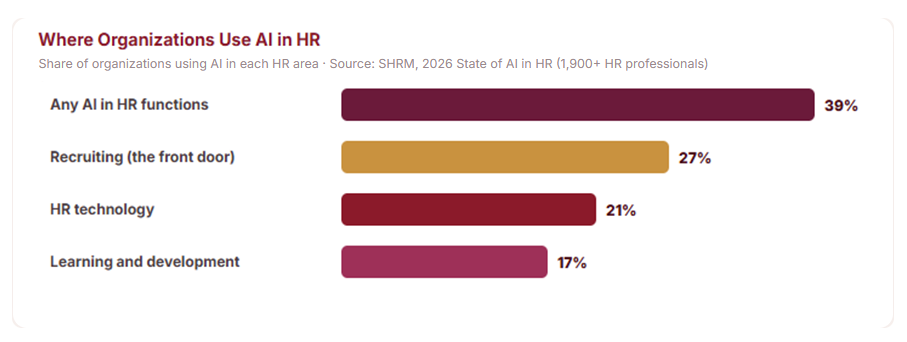
The Front-Door Fallacy is the habit of treating AI in HR as AI in recruiting. SHRM’s 2026 State of AI in HR report, based on more than 1,900 HR professionals, found that 39% of organizations use AI in HR functions. Recruiting leads at 27%, HR technology is at 21%, and learning and development at 17%. Attention follows the front door.
The front door gets the attention for understandable reasons. In our experience, recruiting has the clearest handoff to a tool, because a stack of applications is easy to see. It has the most vendors and the most legal attention, which also makes it the best documented. Those facts do not make it the most expensive stage. Our companion article, Mastering AI Automation for People & Hiring: Write the Scorecard First, covers recruiting in depth. This article covers what happens after a person says yes.
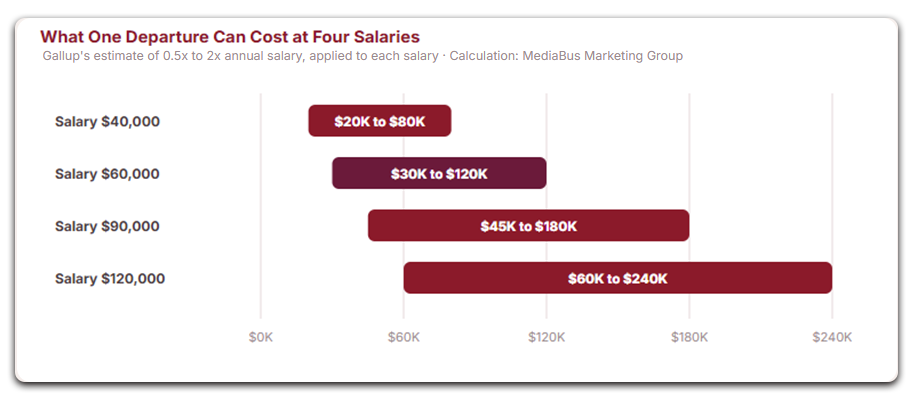
Here is the math that makes this an owner’s problem. Gallup estimates that replacing one employee costs between half and two times that person’s annual salary. At a $60,000 salary, one departure costs $30,000 to $120,000. Gallup also found that 52% of voluntary leavers say their exit could have been prevented, so a large share of departures are ones the leaver believes the company could have stopped.
The more specific Gallup finding is about conversations. Of the voluntary leavers Gallup surveyed, 51% said no manager or leader had talked with them about their job satisfaction or their future in the three months before they left. Those exits did not come out of nowhere. They happened in a silence that a process could have interrupted.
If your AI budget sits at the front door while your departures happen in the hallway, you are optimizing where the work is easiest to see, which is not always where the money leaks.
The Five-Minute Leak Calculation
Gallup’s range is wide on purpose, because the real cost of a departure depends on the role, the seniority, and how long the seat stays empty. The chart applies Gallup’s half-to-two-times range to four common salaries. The arithmetic is ours.
In the Age of AI
You Gain the Advantage over Those Who Don't Step Up
The Whole Building:
Ten Places AI Fits Across the Employee Lifecycle
The employee lifecycle is the sequence of stages a person moves through at a company: recruiting, onboarding, training, day-to-day management, support, retention, and exit. Each stage produces repeated, rule-bound work such as reminders, questions, paperwork, and summaries, and that is the kind of work where AI automation fits best.
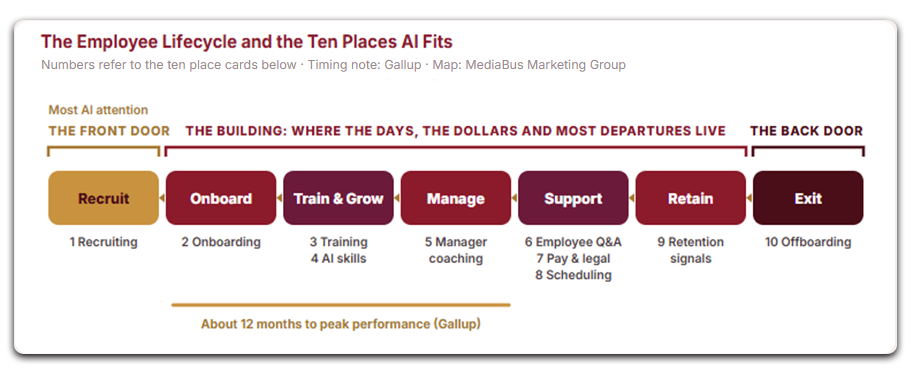
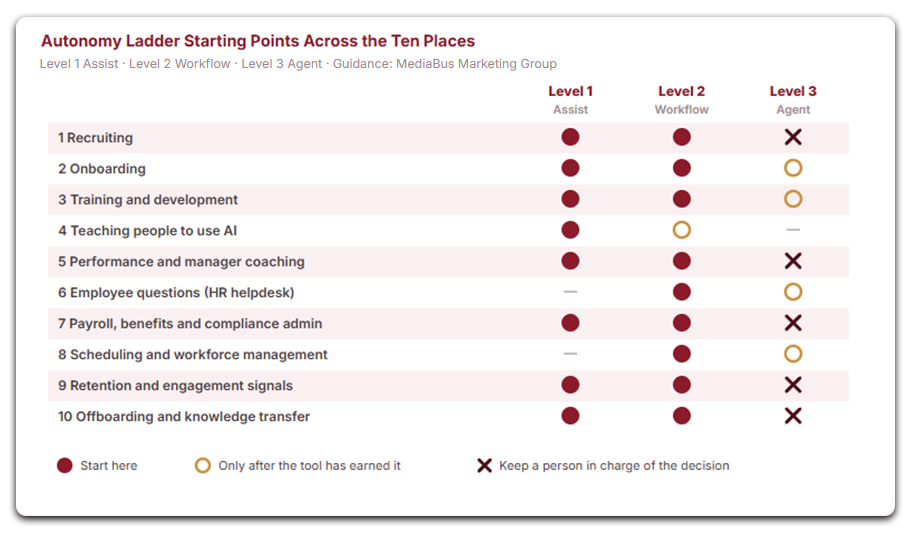
Every place below carries a starting level from MediaBus Marketing Group’s Autonomy Ladder: Level 1 Assist, Level 2 Workflow, and Level 3 Agent. The pillar article, Mastering AI Automation for LLM Success, explains the ladder, and its rule applies to every card: treat each automation like a hire, and promote it only after it has earned the next level.
Start with the Numbers on Onboarding
Gallup’s onboarding research shows how large the gap is between what new hires need and what they get. Only 12% of U.S. employees say their company does a good job of onboarding, and Gallup’s experience suggests new employees typically take around 12 months to reach peak performance.

Only 29% of new hires feel fully prepared and supported after onboarding. Employees with exceptional onboarding are 2.6 times as likely to be extremely satisfied with their workplace. When the manager takes an active role, employees are 3.4 times as likely to feel onboarding was successful.
Where to Start Each Place
The matrix summarizes the starting level for each place. A filled circle means start there. A ring means the tool should earn that level with a track record first. A cross means a person stays in charge of the decision because the decision is about a person.
Three Studies Every Owner Should Know
Case 1: IBM’s HR Assistant Failed Until It Was Redesigned
IBM’s AskHR is the best-documented example of AI automation in employee support. According to a July 2024 Fortune interview with IBM’s chief human resources officer, the first version, rolled out in 2018, was forced on employees and poorly received, with a net promoter score of -35. After IBM redesigned it around what managers actually wanted to do, AskHR grew to handle 94% of queries, about 10.1 million interactions a year, with HR satisfaction scores in the +80s. Sensitive matters still go to people.

The lesson from IBM is about design, not technology. The same underlying idea failed when it was imposed and worked when it was built around the user’s actual job. For an owner, the practical translation is to ask the managers and employees who will use a tool which questions they ask most, and to build the first version around those.
Case 2:AI Helped the Newest People the Most
Erik Brynjolfsson, Danielle Li, and Lindsey Raymond studied 5,179 customer support agents who were given an AI assistant, in a paper published in the Quarterly Journal of Economics in 2025. Average productivity rose 14%. For novice and low-skilled agents, it rose 34%, and the effect on experienced workers was minimal. The authors found the tool appeared to spread the practices of top performers, and it improved retention.
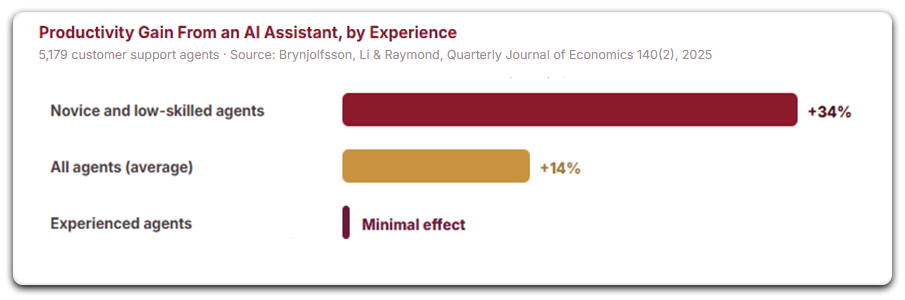
One caution applies. This study covers chat-based customer support, so borrow the principle, not the number. The principle is that AI can carry a top performer’s habits to the person still learning them, which is a training function.
Case 3: Where AI Makes People Worse
Fabrizio Dell’Acqua and colleagues ran a field experiment with 758 Boston Consulting Group consultants. On tasks inside AI’s capabilities, consultants using AI completed 12.2% more tasks, 25.1% faster, with over 40% higher quality. On a task deliberately placed outside AI’s capabilities, consultants using AI were 19 percentage points less likely to produce correct solutions. Consultants in the bottom half of baseline skill improved 43%, compared with 17% for the top half.
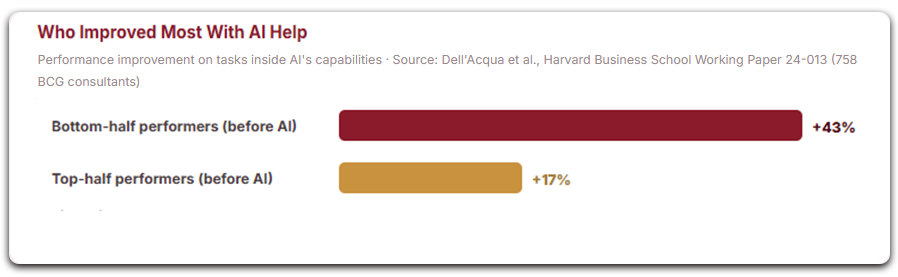
Both studies point in the same direction. AI works as an amplifier for people who are still learning, and it can mislead people when a task falls outside what it does well. In HR, that argues for using AI to coach, prepare, and remind, and against letting it make judgment calls about people on its own. Judgment about a person looks more like the outside-the-frontier task than the inside one. That is our reading, not a finding of either study.
The Manager is Your Real HR System
Gallup’s research finds that managers account for about 70% of the variance in team engagement scores. Gallup’s own pages describe the figure as both “at least” and “up to” 70%, so read it as “a large majority” instead of an exact share. The direction is not in doubt: Gallup also found that one in two employees surveyed (7,272 U.S. adults) had left a job to get away from their manager.
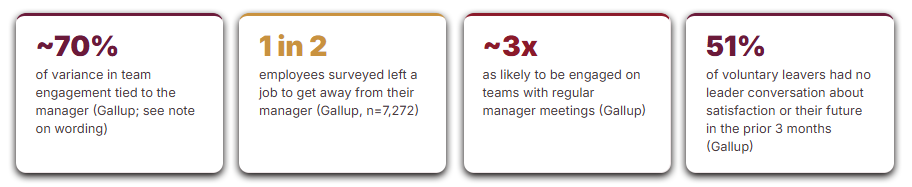
Regular conversation is the lever, and conversation is exactly what busy managers drop first. This is where AI automation earns its keep in HR. The aim is not to replace the manager’s conversation. The aim is to remove every excuse for skipping it.
Five small automations that make the conversation happen
- A reminder when a one-on-one has not happened within the cadence you set.
- A one-page prep sheet before each one-on-one (goals, recent work, open items), drafted by AI from the manager’s own notes and the role’s scorecard.
- A prompt at day 30, 60, and 90 with three questions to ask a new hire.
- A quarterly “stay conversation” prompt for key people: what keeps you here, and what would make you leave?
- A summary for the owner of themes in survey comments and manager notes, with no individual scores.
What stays human is the conversation itself, the judgment behind it, and every decision about pay, promotion, or discipline. A tool that sets up the conversation is a good hire. A tool that holds it for the manager is a risk.
The Law Does Not Stop at the Front Door
The Manager is Your Real HR System
Many owners assume AI employment law is about resume screening. Illinois HB 3773, effective January 1, 2026, covers the use of AI in employment decisions, including hiring, promotion, training selection, discharge, and discipline. Its reach is the whole employee lifecycle, which means a tool that picks who gets training or flags who gets disciplined can be in scope.
Colorado’s SB 26-189, signed May 14, 2026, applies to consequential decisions made on or after January 1, 2027. As we read it, it requires notice to the people affected, disclosure within 30 days after an adverse decision, human review, and three years of records.
At the federal level, Executive Order 14365, signed December 11, 2025, pushes toward a national approach to AI regulation but does not by itself override state laws, so state rules remain what employers must follow. In the courts, Mobley v. Workday is a federal lawsuit alleging that a vendor’s AI screening tools discriminated against applicants. In May 2025, the court conditionally certified an age-discrimination collective, and California state-law claims are proceeding. The allegations are unproven, and Workday denies them.
The practical gap is awareness. SHRM found that 57% of HR professionals in states with AI workforce rules were unaware of them. In our earlier review, we found no Utah statute specific to AI hiring tools, but general employment law still applies to any decision about a person. Ask your employment attorney to review every place on the map that touches hiring, promotion, training selection, pay, discipline, or discharge, and keep a record of what each tool does and who reviewed its output.
This section is general information, not legal advice. Laws in this area are changing quickly, so have an employment attorney confirm what applies to your business and your state.
6 Best Practices for AI Across the Employee Lifecycle
Little-Known Gems
The Perspective Shift
A company does not lose people at the door. It loses them in the hallway: in the weeks nobody checked in, the question nobody answered, and the conversation nobody started.
The companies that win with AI and people will not be the ones with the fastest resume screener. They will be the ones that mapped the whole employee lifecycle, found the leakiest stage, and used automation to make sure the right conversation, the right answer, and the right first week happen on time for every person. A human still decides anything that decides a person’s future. Hiring fills the building. Everything else decides whether it stays full.
The Bottom Line
Here is the bottom line. Hiring gets a person into your building. The next twelve months decide whether you ever earn a return on that hire, and Gallup’s numbers suggest most companies leave that stretch to chance: 12% of employees say their company onboards well, 51% of voluntary leavers had no real conversation about their future in their last three months, and each exit can cost half to two times a salary.
AI will not fix that by itself. Used well, it does something simpler and more powerful: it makes sure the right conversation, the right answer, and the right first week happen on time, every time, for every person. A human stays in charge of every decision about a person.
This is a decision before it is a project. Decide this week which stage of your employee lifecycle leaks the most.
Then put one automation there, at the level it has earned, with a name next to it and a number to measure.
Begin with one hallway. Begin today.
MediaBus Marketing Group helps business owners and executives map the full employee lifecycle, run the leak math with their own numbers, choose which of the ten places to automate first, and build the checks that keep a person in charge. Tell us how people join, learn, and leave your company today, and we’ll show you where to start.
Contact Us Down Below
Human Resources FAQs
1. What are the major places to use AI automation for people and hiring?
There are ten places across the employee lifecycle: recruiting, onboarding, training and development, teaching people to work with AI, performance and manager coaching, employee questions (the HR helpdesk), payroll and compliance admin, scheduling and workforce management, retention and engagement signals, and offboarding with knowledge transfer. SHRM’s 2026 report found AI use in HR is most common in recruiting (27%), HR technology (21%), and learning and development (17%), but the larger cost often sits after the hire. Gallup puts the cost of replacing one employee at half to two times annual salary.2. Where should a small or mid-size business start with AI in HR?
Start at the stage where people leave, which is often onboarding and manager check-ins, not at the stage with the most vendors. Run the five-minute leak calculation, read your exit notes, and pick the stage people describe as confusing or silent. Put a Level 2 workflow there, such as checklists and reminders, and keep a person in the conversation. Gallup found only 12% of U.S. employees say their company does a good job of onboarding, so the room for improvement is large.3. Will AI replace our HR team?
The research we reviewed points to AI taking over routine questions, paperwork, and reminders while decisions about people stay with humans. IBM’s AskHR handles 94% of employee queries, and sensitive matters still go to people. Colorado’s 2026 law requires human review for consequential decisions, and SHRM found 52% of organizations do not involve HR in AI strategy, which is a gap to close, not a reason to cut HR out. We would plan for HR to spend less time on lookups and more on managers and exceptions.4. What laws apply to AI in HR beyond hiring?
Illinois HB 3773, effective January 1, 2026, covers hiring, promotion, training selection, discharge, discipline, and more. Colorado’s SB 26-189 applies to consequential decisions on or after January 1, 2027, and as we read it requires notice, disclosure after adverse decisions, human review, and records. Executive Order 14365 does not by itself override state laws. The Mobley v. Workday case is testing vendor liability, with allegations unproven. This is general information, not legal advice, so have an employment attorney review your tools.5. How do we know whether AI in HR is working?
Record a baseline first, then track one measure per place: 30-, 60-, and 90-day check-in completion and 90-day retention for onboarding, time to competence for training, resolution and handoff rates for the HR helpdesk, error rates for payroll, and overtime and unfilled shifts for scheduling. Repeat the leak calculation each year to see whether avoidable departures fell. SHRM found 56% of organizations do not formally measure ROI on AI in HR, so a simple baseline puts you ahead.
Action Items:
Sources Cited in This Article
- Gallup: This Fixable Problem Costs U.S. Businesses $1 Trillion
- Gallup: Employee Engagement
- Gallup: Onboarding
- Gallup: Indicator, Artificial Intelligence
- Fortune: IBM CHRO on AI chatbot rollout lessons (July 2024)
- SHRM: State of AI in HR 2026
- Brynjolfsson, Li and Raymond, Generative AI at Work (NBER w31161)
SHARE THIS STORY ANYWHERE YOU LIKE
SHARE THIS STORY ANYWHERE

Mastering AI Automation for Data Reporting and Decision Support
Mastering AI Automation for Data, Reporting and Decision Support AI will answer any question about your numbers. First, [...]
Mastering AI Automation for Knowledge and Institutional Memory
Mastering AI Automation for Knowledge and Institutional Memory Don’t hoard your knowledge. Don’t dump it in a tool. [...]
Mastering AI Automation for People and Hiring
Mastering AI Automation for People and Hiring Everyone is automating the front door. The money leaves through the [...]