

Mastering AI Automation for Finance and Back Office
The back office that never forgets.
Most back-office losses are small and quiet: an invoice nobody coded, a receipt nobody read, a contract that renewed on its own, a deadline that moved. None of these is hard. Each one waits for someone with time to look. AI can read everything and remember every date, which suits it to seven back-office jobs: invoice capture and coding, expense reports, reconciliation, collection reminders, contract review, compliance tracking, and internal IT and admin requests. People still make the decisions, and the controls stay in place.
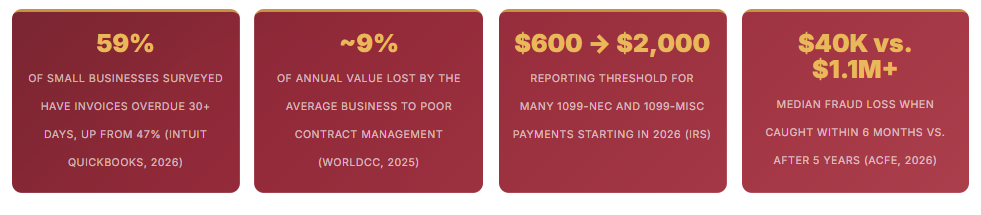
At a glance: 59% of small businesses surveyed have invoices overdue 30+ days, up from 47% (Intuit QuickBooks, 2026) · ~9% of annual value lost by the average business to poor contract management (WorldCC, 2025) · $600 → $2,000 reporting threshold for many 1099-NEC and 1099-MISC payments starting in 2026 (IRS) · $40K vs. $1.1M+ median fraud loss when caught within 6 months vs. after 5 years (ACFE, 2026)
What you’ll find in this article
- An office manager’s notebook of things that slipped, and what happened when a system started reading and remembering
- Why back offices forget, and what small-business owners say they want AI to take on
- Seven back-office jobs (invoice capture and coding, expense reports, reconciliation, collection reminders, contract review, compliance tracking, and internal IT and admin requests), each with what AI does, the check that goes with it, who decides, and where to start
- Fraud protection as part of the work: why early detection matters, which schemes show up in back-office data, and how to keep an independent checker
- Six best practices, five little-known gems, and a direct next step
The Notebook of Things that Slipped
The office manager at an electrical contractor kept a notebook in her top drawer. She called it “things that slipped.” Nothing in it was dramatic. At the end of one quarter, it held seven entries: a software subscription that renewed itself at a higher price, two customers who never got a reminder, a subcontractor paid over the 1099 limit with no W-9 on file, an expense report with a receipt dated the wrong week, a bank deposit that sat unmatched for six weeks, a new hire’s laptop request that waited nine days in someone’s inbox, and an insurance certificate that expired without anyone calling.
Nobody had been careless. Each item needed someone to read a document or remember a date, and the people who could have done it were busy with work that paid. The owner’s first instinct was to hire. Instead, he asked a narrower question: which of these could a system read and remember for us, as long as a person still decided?
Over the next two months they put an AI tool on each one. It read incoming invoices and suggested the coding. It checked expense lines against the policy and the receipts. It matched bank lines to the books and listed what it couldn’t match. It sent customer reminders on a schedule. It pulled renewal dates and notice windows out of the contracts. It kept a calendar of filings, licenses, and certificates. It answered routine employee questions and routed the rest. The notebook didn’t empty by magic. It emptied because something now read everything and remembered every date. The office manager still reviewed every flag and made every call, and she spent her days on the exceptions.
Keypoint: A back office rarely fails at hard problems. It fails at attention and memory, and those are the two things AI can supply cheaply. The sections below cover seven jobs where that applies, the evidence for each, and the checks that keep a person in charge of the money.
Why a Back Office Forgets
Small businesses say manual work is what slows their payments. Intuit’s 2026 Small Business Late Payments Report, drawn from surveys it commissioned, found that 74% of businesses are not fully automated in managing and paying bills, and that manual processes were the top internal reason for delayed outgoing payments. Thirty-nine percent of businesses said internal challenges had delayed payments they owed to contractors, suppliers, vendors, or creditors. Intuit sells accounting software, so read the survey as vendor research.
That’s why, in times past, one of the first hires in the office after the Office Manager was an accounts receivable/payable person. Today’s owners also say where they would use AI. In this same report, the areas where they saw the most opportunity were reminders to pay bills (40%), data entry (37%), spending insights (33%), fraud detection (32%), and matching bills to the right expenses or payees (32%). Those answers describe reading and remembering work, which is what the seven jobs in this article have in common.
This is the type of thing that today’s capabilities with AI are prime for all that is wanted above, yet, like all things with AI, still requires human supervision in what it’s set out to do. In an October 2026 study by Mercor, a company that builds AI evaluations, 12 licensed CPAs averaging about five and a half years of experience did four simplified month-end accounting tasks. They averaged about 37% of the grading criteria. Meaning their capacity to be as efficient as they possibly could was clocked at that average – 37%. Claude Opus 5 scored 100% on all 20 attempts, each in under ten minutes. Mercor says the tasks suited what models do best: being detail-oriented, searching files, and following instructions closely.
The reading that matters: AI is a strong reader and rememberer of structured material, and not yet a dependable closer of the whole job. That is why each of the seven jobs below has a person who decides and a check that runs alongside. The pairing is our working guidance.
In the Age of AI
You Gain the Advantage over Those Who Don't Step Up
The Seven Back-office Jobs AI Can Take On
Each card below describes the job, the evidence we found, the corresponding check, who decides, and a suggested starting level from the Autonomy Ladder in our pillar article, Mastering AI Automation for LLM Success. Level 1 means AI drafts and a person decides. Level 2 means fixed steps run automatically and people review the exceptions. We don’t recommend Level 3, where an agent acts on its own, for anything that moves money, signs a contract, or grants access. The starting levels are MMG working guidance, not research findings.
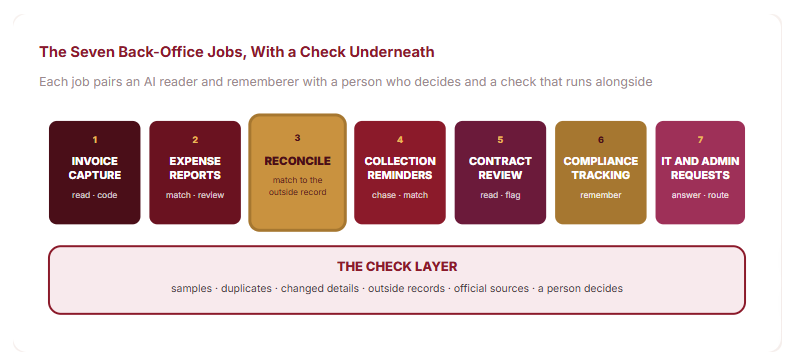
The map: 1 Invoice capture → 2 Expense reports → 3 Reconcile → 4 Collection reminders → 5 Contract review → 6 Compliance tracking → 7 IT and admin requests, with a check layer underneath: samples · duplicates · changed details · outside records · official sources · a person decides.
Fraud Protection Goes with Every Job
The Association of Certified Fraud Examiners analyzed 2,402 cases in its Occupational Fraud 2026 report. The median scheme ran 12 months before anyone detected it. Fraud caught within six months had a median loss of $40,000, and schemes that lasted more than five years had median losses above $1.1 million. Tips were the most common way fraud was found, at 43% of cases, and more than half of those tips came from employees.
The longer it runs, the more it costs (ACFE 2026, median loss): caught within 6 months $40,000 · ran longer than 5 years $1.1M+.
Several of the schemes in the ACFE’s data run through the same back-office jobs described above. In its 2024 report, billing schemes appeared in 22% of cases (median loss $100,000), expense reimbursement schemes in 13% ($50,000), and check and payment tampering in 11% ($155,000). An accounting-firm summary of that report notes that billing, check and payment tampering, expense reimbursement, and skimming schemes were more common in smaller organizations than in larger ones.
Payment fraud adds another reason to keep a person at the point where money leaves. The FBI’s 2025 Internet Crime Report recorded 24,768 business email compromise complaints and $3.05 billion in reported losses. The FBI’s Financial Fraud Kill Chain, which works with banks to freeze funds, handled 3,900 incidents in 2025 and froze $679 million of $1.164 billion in attempted theft, a 58% success rate. The FBI’s advice is that if you discover a fraudulent transfer, you should contact your bank immediately to request a recall and file a complaint at ic3.gov.
An independent checker is the most practical way to shorten the time to detection. The ACFE’s 2024 report found proactive data monitoring in 45% of cases, with a median loss of $100,000 where it was in place and $200,000 where it was not, and a median duration of 9 months against 18. Those are associations in case data, not proof of cause. A nightly AI review that reads every invoice, expense line, and payment and lists the few that look unusual fits that description. The review should be separate from whatever prepared the work; it should flag instead of deciding, and a person should decide.
Because AI results can vary from run to run (APEX-Accounting found no model fully right on all eight attempts for more than 2.6% of tasks), test the checker before you trust it. Each month, plant a known duplicate invoice or a changed bank detail in a test file and confirm the checker catches it. Run the same review twice and compare. Review transactions, not people, and talk to counsel before monitoring employee communications. This is general information, not accounting or legal advice.
Little-Known Gems
The Perspective Shift
A back office is the company’s memory. Most of what it loses, it loses by forgetting, and software can now remember every date and read every page.
The practical question for an owner is where the forgetting is costing money today. Most companies already know the answer, because somebody keeps a list. AI can take the reading and the remembering, and people keep the decisions that need judgment: approving payments, negotiating contracts, interpreting rules, and keeping promises to customers and employees. That arrangement costs far less than hiring more people to look.
Bottom line: let’s find your notebook
Every back office has a list of things that slipped, even if it lives in someone’s head. Writing it down is the first step, and it takes an hour.
MediaBus Marketing Group helps business owners and executives map their back-office work, choose which of these seven jobs to automate first…
… and build the checks that keep a person in charge of the money, the contracts, and the access.
Tell us what slipped last quarter, and we’ll help you see where to start.
To Connect Fill Out the Form Below
Financial AI FAQs
Q1: Which back-office jobs should we automate first?
Start with reading and reminding jobs, where a mistake is cheap to catch: invoice capture and coding, expense review, collection reminders, and routine IT and admin questions. Owners in Intuit’s 2026 survey said they saw the most room for AI in bill reminders (40%) and data entry (37%), and Gartner found 37% of finance teams using AI had automated accounts payable. Pick the job with the clearest baseline, such as days to pay an invoice or hours spent on expense reports. Keep money, contracts, and credentials at Level 1, where a person reviews before anything happens.
Q2: Can AI read and code invoices accurately enough to trust?
It can do much of the work, and you should verify it. In Mercor’s October 2026 study, AI beat 12 licensed CPAs on four simplified month-end tasks, but on the harder APEX-Accounting benchmark no model got more than 2.6% of tasks fully right on all eight attempts. Published cost-per-invoice figures vary by source, so measure your own. Sample extracted fields against the documents each week, hold duplicates and changed bank details for a person, and let only a person add new vendors. The ACFE’s 2024 data found billing schemes in 22% of cases.
Q3: Is it safe to use AI to review contracts?
It is useful as a reading aid, and a lawyer should review anything you sign or rely on. In the Vals Legal AI Report (February 2025), legal AI tools beat a lawyer baseline on document Q&A, data extraction, and summarization, and lawyers won on redlining. A Stanford study of legal research tools, tested in 2024, found hallucination rates of 17% to 33%, though it measured legal research and not reading a contract you supply. Use AI to extract renewal dates, notice windows, prices, and exit terms, and to summarize in plain English. This is general information, not legal advice.
Q4: How can AI keep us compliant when rules change?
By tracking deadlines and gaps against official sources that carry dates, with a named person who owns each obligation. The IRS states that the reporting threshold for many 1099-NEC and 1099-MISC payments rose from $600 to $2,000 for tax years beginning after 2025, which shows how a list can go stale. We found no rigorous study of AI compliance tracking in small businesses, so treat it as a method to test. Have your CPA or attorney confirm what each rule means for you before you act.
Q5: Where does fraud protection fit in all this?
It runs alongside each job. The ACFE’s 2026 data shows frauds caught within six months had a median loss of $40,000, against more than $1.1 million for schemes lasting over five years. The FBI recorded $3.05 billion in business email compromise losses in 2025. Keep a separate AI checker that reviews invoices, expenses, and payments and flags what looks unusual; keep a person at the point where money leaves; test the checker monthly with a planted example, and write down your bank’s recall steps and the FBI’s ic3.gov reporting process. This is general information, not accounting or legal advice.
Action Items:
Sources Cited in This Article
All sources were read in September and October 2026. Intuit QuickBooks, “2026 Small Business Late Payments Report” (July 2026; surveys commissioned by Intuit, including 1,305 US business owners surveyed in December 2025) · World Commerce & Contracting, Contract Management white paper (August 2025) · Vals AI, Vals Legal AI Report (February 27, 2025), as reported by Vals and coverage in LawSites and the Maryland State Bar Association · Magesh et al., “Hallucination-Free? Assessing the Reliability of Leading AI Legal Research Tools,” Journal of Empirical Legal Studies 22(4), 2025 (tools tested May 2024) · IRS, Publication 1099 (2026) and Instructions for Forms 1099-MISC and 1099-NEC · CISA, FBI, and partners, Advisory AA23-320A, “Scattered Spider” (updated July 29, 2025) · Brynjolfsson, Li, and Raymond, “Generative AI at Work,” NBER Working Paper 31161 (April 2023, revised November 2023; not peer-reviewed in that version) · Gartner, “Gartner Survey Shows Finance AI Adoption Remains Steady in 2025” (November 18, 2025) · Mercor, “Human Baselines for Benchmarks: AI Now Outperforms Junior Accountants” (October 1, 2026), and Benchek et al., “APEX-Accounting,” arXiv 2607.27189 (July 2026) (Mercor and Ramp both sell AI-related products) · Penrose, AccountingBench (July 2025), as summarized by GIGAZINE · Association of Certified Fraud Examiners, Occupational Fraud 2026 (key-findings page and press release, May 2026) and Occupational Fraud 2024 (scheme and control tables), with the smaller-organization comparison as summarized by Anchin and control-effectiveness percentages as summarized by accounting firms Kirsch and PBMares · FBI Internet Crime Complaint Center, 2025 Internet Crime Report (April 2026), including the Financial Fraud Kill Chain · Utah S.B. 226 (2025 General Session; effective May 7, 2025).
SHARE THIS STORY ANYWHERE YOU LIKE
SHARE THIS STORY ANYWHERE

Mastering AI Automation for Data Reporting and Decision Support
Mastering AI Automation for Data, Reporting and Decision Support AI will answer any question about your numbers. First, [...]

Mastering AI Automation for Knowledge and Institutional Memory
Mastering AI Automation for Knowledge and Institutional Memory Don’t hoard your knowledge. Don’t dump it in a tool. [...]

Mastering AI Automation for People and Hiring
Mastering AI Automation for People and Hiring Everyone is automating the front door. The money leaves through the [...]