

What Business Processes Should I Automate First?
The proven framework for cutting the tasks quietly stealing your time, your revenue, and your growth — starting with the one move that pays you back fastest.
What You’ll Find in This Article…
You already know automation is the answer. What you need is a clear-eyed map of exactly where to start – so you don’t waste months implementing the wrong thing while your highest-leverage opportunities bleed time and money every single day. This article gives you the research-backed framework, the ranked priority list, and the cautionary truths that separate businesses building real systems from ones buying more tools they never fully use.
- Why workflow redesign matters more than the tools you choose – the McKinsey finding most SMBs never hear
- The 4-Question Automation Audit that identifies your highest-ROI processes in under 60 minutes
- The 7 business processes SMBs should automate first, ranked by speed-to-ROI and documented impact
- Why lead follow-up automation is the single highest-returning first move for almost every business – and the exact dollar math behind it
- The “automate a broken process” trap and how to avoid becoming more efficient at doing the wrong thing faster
- A 90-day activation sequence that builds momentum without overwhelming your team or your budget
- The 5 processes you should NOT automate yet – and the criteria that tell you when they’ll be ready
She had built a $600,000 consulting practice with nothing but a laptop, a legal pad, and an iron work ethic. She answered every inquiry herself. She wrote every invoice manually. She followed up on every proposal with a personal phone call. She onboarded every client with a custom welcome email she retyped from memory each time. She was proud of it – the personal touch, the attention to detail, the sense that nothing fell through the cracks on her watch. And then one March morning, she sat down and did the math. Between following up on leads, sending invoices, chasing payments, scheduling calls, and repeating the same onboarding steps for every new client, she was spending 23 hours every week on work that produced nothing a piece of software couldn’t do in seconds. Twenty-three hours. Every week. That was the year before she burned out and almost closed the business she’d spent seven years building. It didn’t have to be that way.
That story lives in hundreds of thousands of businesses right now – different industries, different sizes, same exact, identical problem. The owner is talented. The team is capable. The product or service is genuinely excellent. But somewhere between the doing of the work and the running of the business, a massive hidden tax is being paid – in time, in energy, in mistakes, in opportunities missed while the team is buried in tasks that should have been automated two years ago.
This article is about ending that tax. Not by deploying every automation tool available. Not by transforming your operation overnight. By identifying – with precision, backed by real data – the specific processes where automation delivers the fastest, highest, and most certain return. Then starting there, building momentum, and expanding from strength.
The Number That Should Change Everything
Before we talk about what to automate, you need to sit with a finding from McKinsey that most business owners and marketing articles quietly skip over. Ready?
Among all 25 factors studied in their research on AI and automation adoption, the single variable with the biggest effect on whether companies see actual bottom-line impact is not the tools they choose. It is not the budget they invest. McKinsey research found that among all 25 factors studied, the redesign of workflows – not the AI tools themselves – has the biggest effect on whether companies see actual bottom-line impact.
Read that again. The tools are not the differentiator. Workflow redesign is.
This means that the most dangerous thing you can do with automation is move too fast. Automate a broken process, and you haven’t fixed it – you’ve locked it in place and scaled it. The businesses getting transformational results from automation in 2026 are the ones that paused, mapped their processes honestly, eliminated the waste, and then automated the streamlined version. That discipline is what separates the 80% who see no meaningful bottom-line impact from the 20% who report the numbers everyone wants.
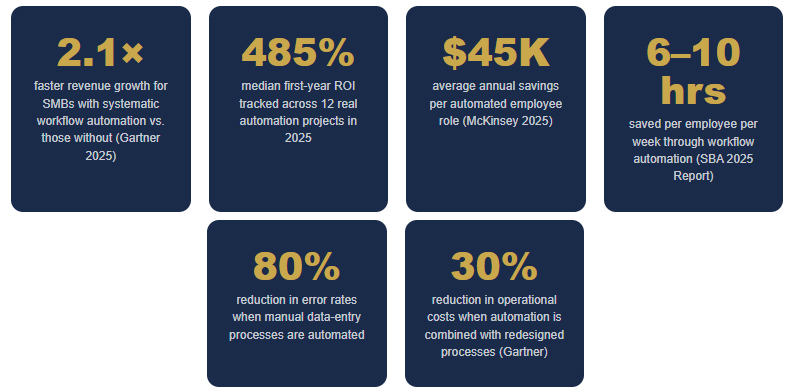
The median first-year ROI tracked across real automation projects was 485%. The highest was 1,200% – a simple Zapier workflow replacing 20 hours per week of manual data entry at a 15-person company. The consistent finding: simple automations targeting high-frequency manual tasks deliver the fastest ROI.
“The tools aren’t the differentiator. Workflow redesign is. Automate a broken process and you haven’t fixed it — you’ve just made it faster to fail.” — McKinsey Global AI Research, 2025

In the Age of AI
You Gain the Advantage over Those Who Don't Step Up
The 4-Question Automation Audit
The 7 Processes to Automate First – Ranked by ROI
What follows is a ranked sequence built on 2025–2026 SMB data: frequency of implementation, speed to measurable return, and documented revenue or cost impact. Start here.
01 — Lead Follow-Up & Response Automation
Highest direct revenue impact • Fastest ROI • Start here, no exceptions
If there is one automation you implement before everything else, this is it. Not invoicing. Not social media. Not reporting. Lead follow-up. The gap between when a prospect reaches out and when your business responds is the single highest-ROI window in your entire operation – and for most SMBs, it is hemorrhaging money every day the process stays manual.
The average small business follows up on only 60–70% of inbound inquiries due to volume and manual process limitations. Automating lead acknowledgment, qualification, and follow-up sequences typically recovers 10–20% of lost leads within the first 60 days – with direct revenue impact that exceeds platform costs within 30–60 days.
Reducing lead response time from hours to minutes increases conversion rates by 5–25% depending on the industry. The mechanics are straightforward: a lead arrives (form submission, phone inquiry, chatbot interaction, ad click). The automation fires immediately – a personalized confirmation email goes out, a CRM record is created, the right team member is notified, and a follow-up task is created if no response occurs within 24 hours. None of this requires a human touch. All of it requires consistency that manual processes can never sustain at volume. Automation Atlas
★ Documented ROI Range: 340–410% ROI. Automating lead follow-up recovers 10–20% of lost leads within the first 60 days.
MMG Implementation Tips:
- Deploy a five-minute response window – beyond that, conversion drops measurably for most business categories
- Trigger chain: form submission → CRM record + personalized email + team notification + 24-hour follow-up task
- Test your own lead flow right now: submit your contact form and see what happens. That experience is what every prospect gets.
- Tools: MMG connected LocalBusiness Pro or your already existing CRM with automation features activated
02 — Invoice, Billing & Payment Follow-Up
Cash flow protection • Eliminates awkward chasing • Recovers lost revenue silently
Cash flow is oxygen to a company. Late invoices are a slow suffocation. Connecting your CRM to tools like Stripe or QuickBooks means invoices go out automatically when a project milestone is hit or a service is delivered. Payment reminders follow without awkward manual chasing. Cash flow becomes more predictable. The time your bookkeeper spent on invoice admin gets redirected to work that actually requires a human brain.
Companies automating invoice processing, contract extraction, and data entry are reducing processing time by 75–90%. Invoice and document processing delivers 400–520% ROI – the highest of any financial automation category.
For a business running $500K annually, shaving even two weeks off average collection time through automation is a five-figure cash flow improvement.
★ Documented ROI Range: 400–520% ROI. Processing time reduced 75–90%. Cash flow improvement begins within the first billing cycle.
MMG Implementation Tips:
- Connect your CRM or project tool to your accounting software – milestone hit → invoice sent, no human required
- Three-tier reminder cadence: gentle at 7 days, firm at 21 days, escalation path at 30 days
- Include one-click payment links in every automated reminder – friction is the enemy of payment speed
- Tools: QuickBooks + Zapier, FreshBooks automation, or HoneyBook for service businesses
03 — Client Onboarding Workflows
First impressions at scale • Eliminates dropped balls • Sets the relationship tone
The moment a client says yes is the moment your relationship with them either deepens or begins to erode. A good onboarding automation creates the project folder, sends the welcome kit, kicks off the intake questionnaire, and schedules the kickoff call – all automatically, all consistently. First impressions are set the moment a client says yes.
Every client gets the same excellent first experience, regardless of what else is happening in the business that week. Consistent onboarding significantly reduces the time-to-value gap – how long it takes a new client to experience the first tangible benefit of working with you. Shorter time to value means higher early satisfaction, lower early churn, and better reviews.
★ Documented ROI Range: 250–310% ROI. Consistent first impressions reduce early churn by a measurable margin in every industry studied.
MMG Implementation Tips:
- Trigger: deal marked “Won” in CRM → full sequence fires automatically
- Sequence includes: welcome email, intake form link, folder creation, team notification, kickoff calendar invite
- Build for your best-case onboarding – the one you’d run if you had unlimited time. Then automate that standard.
- Tools: HoneyBook (service businesses), HubSpot workflows, or custom Zapier/Make.com sequences
04 — Appointment Scheduling & Confirmation
4.2 hrs/week recovered • Eliminates no-shows • Zero back-and-forth
Count how many emails it takes your team to schedule the average client meeting. If the answer is more than one, you have an automation problem. According to IDC’s 2025 SMB Productivity analysis, automated appointment scheduling recovers an average of 4.2 hours per week for small business owners – time that goes directly into billable work or business development.
Appointment scheduling automation gives prospects and clients a direct link to your real-time calendar availability. They pick a time. The booking is confirmed automatically. A reminder fires 24 hours before, and another fires one hour before. A no-show triggers an automated graceful reschedule sequence – not an angry follow-up, a graceful reschedule offer.
For a business owner billing $150/hour, 4.2 recovered hours per week is over $32,000 per year in recovered billable capacity.
★ Documented Impact: 4.2 hours/week recovered per business owner. No-show rates drop significantly with automated reminders. Cost of implementation: under $30/month.
MMG Implementation Tips:
- Tools: LocalBusiness Pro integrates directly with your calendar
- Set buffer time between appointments automatically – no more back-to-back calls with no transition
- Add intake questions to the booking form – arrive at every call with context, not questions
- Connect booking confirmation to your CRM – a booked call should automatically update the lead record
05 — Email Marketing Sequences & Nurture
Compound revenue over time • Converts leads you’d otherwise lose • Runs while you sleep
Most businesses have leads that are interested but not ready. The buyer who downloaded your free guide went quiet. The prospect who attended your webinar but didn’t book a call. Manually staying in front of all of them is impossible. Automation makes it inevitable.
Businesses using automation see an 80% increase in lead volume and 77% higher conversion rates. Automated nurturing and scoring drive significantly better results. Companies implementing automation see a 10%+ revenue boost within 6–9 months.
Email marketing automation sequences – triggered by specific behaviors, lifecycle stages, or time intervals – keep your brand present with every lead and past client in your database, delivering relevant value at the right moments without your team writing a single word after setup.
★ Documented ROI Range: 80% more leads from existing traffic. 77% higher conversion rates from automated nurturing. 10%+ revenue boost within 6–9 months.
MMG Implementation Tips:
- Build three sequences first: new lead welcome (5–7 emails), post-purchase follow-up (3 emails), and win-back for dormant contacts (3 emails)
- Every sequence should deliver value before it asks for anything – educate, then invite
- Use behavioral triggers, not just time triggers: opened email → different branch than didn’t open
- Tools: ActiveCampaign, Klaviyo, or Mailchimp – robust automation builders at SMB price points
06 — Social Media Scheduling & Content Distribution
Consistency without the daily grind • Brand presence 365 days • Reclaims creative bandwidth
Here is the social media truth that kills most SMB marketing programs: consistency beats quality. A brand that posts three times a week for twelve months with decent content will always outperform a brand that posts brilliant content intermittently between busy seasons. The algorithm rewards consistency. The audience rewards familiarity.
Social media scheduling automation means a batch of content — created once per week or once per month – gets scheduled, optimized for posting time per platform, and distributed automatically while your team does higher-value work. The result is a brand presence that looks like a full-time social media manager running on the infrastructure of a 30-minute weekly content session.
★ Documented Impact: SMBs using scheduling automation maintain consistent brand presence through 100% of business cycles. Average time savings: 5–8 hours per week for business owners managing their own social media.
MMG Implementation Tips:
- Batch-create content once per week in a 90-minute session; let automation handle the rest
- Build a 30-day content library as a buffer – never scramble for content during busy weeks again
- Tools: MMG connected Content Management Solutions for scheduling; Count it in for visual creations as well
- Use your Voice Document as input for AI caption generation – your voice, not the tool’s default
07 — Reporting, Analytics & Performance Dashboards
Automated intelligence • Stop living in spreadsheets • Decisions based on current data
Most business owners make decisions based on data that is weeks old, manually compiled by someone who had to stop doing something else to pull it together. AI can now assemble your marketing performance, sales pipeline, revenue trends, and operational metrics into a clean dashboard that updates automatically and lands in your inbox every Monday morning.
Mature automation programmes are now measuring hard savings (direct labor cost reduction), soft savings (time recaptured and reduced burnout), and revenue impact (faster customer response times and improved conversion rates). Businesses that only count hard savings are consistently underreporting the true value of their automation investments.
★ Documented Impact: Companies using AI for analytics report a 32% increase in ROI across marketing functions. 3–6 hours per week are recovered from manual report compilation per team member.
MMG Implementation Tips:
- Start with one dashboard that consolidates your three most revenue-critical metrics – clarity beats complexity every time
- Set up automated weekly email delivery to your leadership team – decisions should never wait for someone to pull data
- Tools: LocalBusiness Pro for multi-platform consolidation
- Define which metrics you actually make decisions from before you build the dashboard – measure the right things, not everything
What NOT to Automate … Yet
The discipline of knowing what to automate first is only half the equation. The other half is knowing what not to touch. Every business that has burned time and budget on the wrong automation has learned this lesson the expensive way. You don’t have to.
Your 90-Day Activation Sequence
We consistently overestimate what we can accomplish in a year and underestimate what we can accomplish in a decade. Automation follows the same law. The businesses that build lasting systems do it in focused, sequential waves – not in frantic all-at-once overhauls.
Days 1–30: The Audit & First Win
- Run the 4-Question Automation Audit across your top 10 most time-consuming processes
- Document your highest-scoring process completely – every step, every decision point, every handoff
- Redesign the process before you automate: eliminate unnecessary steps, reduce handoffs, simplify decisions
- Implement your single highest-priority automation (for most businesses: lead follow-up)
- Define your success metric before you launch – leads contacted within 5 minutes, payment collection time, etc.
- Run for 30 days, measure against your baseline, and document the result internally
Days 31–60: Build on the Win
- Use the ROI from your first automation to build internal confidence and justify the next investment
- Implement your second and third highest-priority processes (typically: invoicing + onboarding, or email nurture + scheduling)
- Connect your automations – a lead captured in automation #1 should feed into the nurture sequence from automation #5
- Identify one manual reporting task consuming team hours and replace it with an automated dashboard
- Review CRM and chatbot logs from month one – every gap is a refinement opportunity
Days 61–90: Connect the System
- Map the full lead-to-revenue path and identify every remaining manual handoff – each one is an automation candidate
- Implement social media scheduling automation – your brand presence should run on infrastructure, not willpower
- Set up predictive alerts: churn risk, overdue invoices, stale leads – the system should surface problems before they cost you
- Conduct an automation health review: which workflows run cleanly? Which needs refinement? Which weren’t worth building?
- Plan your next 90 days based on what the data is telling you – you now have three months of real automation intelligence
The Real Competitive Advantage in This
The most valuable thing a person can do is find their gift and then pour themselves into delivering it – not into the administrative machinery that surrounds it. That truth applies to businesses as perfectly as it applies to individuals. Your competitive advantage is not in answering your own leads. It is not in typing invoices. It is not in manually posting to social media three times a week.
Your competitive advantage is in the thing that only you and your team can provide – the expertise, the relationships, the creative insight, the quality of service that made your customers choose you in the first place.
Automation’s highest purpose is not efficiency for its own sake. It is the liberation of human capability from low-value repetition, so that the people in your business can pour themselves into the work that actually matters. Every hour recovered from manual follow-up is an hour available for a deeper client conversation. Every invoice that goes out automatically is mental bandwidth returned to strategy. Every onboarding sequence that runs itself is a first impression delivered with a consistency that manual effort could never guarantee.
Small businesses that implement systematic workflow automation grow revenue 2.1× faster than those that don’t, primarily through improved lead conversion and operational capacity. The businesses winning in 2026 are not the ones with the most automation tools. They are the ones who have been the most thoughtful about which human work they want to protect – and have used automation strategically to clear the path to it.
Ready to Build Your Business Automation System?
MediaBus Marketing Group designs and implements custom AI-driven automation workflows for small and mid-sized businesses in Utah and beyond – built around your specific processes, your brand voice, and your growth goals. Let’s map your first automation together.
👉 Get Your Free Automation Strategy Session → Fill Out the Form Below
No obligation • No jargon • A real conversation about where automation will move the needle fastest in your business (801) 893.1398 • info@mediabusmarketing.com • Monday–Friday
First Automations FAQs
Q1: I’ve heard automation can depersonalize a business. How do I automate without losing the human touch?
This is the right question, and the answer is more reassuring than most people expect. The processes that benefit most from automation – lead acknowledgment, invoice reminders, appointment scheduling, onboarding steps – are not the places where your human personality differentiates you. They are logistics. Your differentiation lives in the quality of your actual service delivery and the genuine care you bring to client relationships. When you automate logistics, you free your human energy for the interactions that actually matter. The trick is to write your automated messages in your own voice – with your specific language, your personality, your warmth – rather than using generic templates. An automated email that sounds genuinely like you creates a better impression than a hastily typed manual email written at 10 PM when you’re exhausted. Automation, done thoughtfully, doesn’t remove the human from your business. It concentrates and elevates it.
Q2: What’s a realistic budget for a small business getting started with automation?
The good news: meaningful automation is genuinely accessible at SMB budgets. Appointment scheduling automation starts at $0–$16/month. Email marketing automation starts at $20–$50/month depending on list size. A social media scheduling tool runs $15–$50/month. A CRM with automation capability — HubSpot’s free tier – can be started at zero cost. For most small businesses, a functional automation stack can be built for $75–$200/month in tool costs. Most businesses report time savings of 20+ hours per month and cost savings of $500–$2,000 monthly – meaning even a modestly priced automation stack pays for itself multiple times over in the first 90 days.
Q3: How do I know if my team will actually use and maintain the automations I build?
Adoption is a real challenge – and it is primarily a leadership and communication challenge, not a technology one. Businesses with the highest automation adoption rates share three practices: they involve the people who currently do the manual work in the design of the automation (creating ownership rather than resistance), they treat the first automation as a learning project and celebrate the result publicly, and they maintain clear human accountability within automated processes. The biggest adoption killer is launching automation without training the people it affects on how to interact with it, interpret its outputs, and handle exceptions. Invest one hour in an internal walkthrough of every new automation before it goes live. That hour pays back in months of smooth operation.
Q4: We’re a service business — is automation really relevant to us, or is it more of an e-commerce thing?
Contractors and home service businesses miss 60–80% of incoming calls, according to industry data. Each of those missed calls represents $200 to $2,000 in potential revenue. When the math is that clear, the investment in AI becomes obvious. Service businesses – consultants, healthcare providers, real estate professionals, legal practices, restaurants — depend entirely on consistent lead follow-up, reliable appointment scheduling, smooth onboarding, and professional billing – all processes that are fundamentally repeatable and ideal for automation. Service businesses often have longer, higher-value client relationships than e-commerce, which means every lead that manual processes fail to respond to fast enough represents a much larger lost revenue opportunity.
Q5: What happens when something goes wrong with an automated process? How do I maintain control?
Every automation you deploy needs four things: a human owner responsible for its performance, a monitoring mechanism that alerts that human when the automation fails, a documented exception path for situations the automation cannot handle, and a regular review schedule (monthly for the first 90 days, then quarterly). In practice, this means every automated workflow has a named person who receives failure notifications, reviews output samples, and handles exceptions. Your CRM sends a daily summary of automation activity so you can spot anomalies. Your chatbot has a clear escalation path to a human for any query it cannot confidently answer. Automation does not remove human accountability – it changes its form, from doing the task manually to owning the system that does it. Well-governed automation fails gracefully, notifies the right person, and resumes cleanly.
Action Items:
SHARE THIS STORY ANYWHERE YOU LIKE
SHARE THIS STORY ANYWHERE

Mastering AI Automation for Finance and Back Office
Mastering AI Automation for Finance and Back Office The back office that never forgets. Most back-office losses are [...]
Mastering AI Automation for Project and Task Management
Mastering AI Automation for Project and Task Management Your plan is a prediction. AI's best job is remembering [...]
AI Operations: Automating Supply Chain, Scheduling & More
AI Operations: Automating Supply Chains, Scheduling, & More The Most Profitable AI in Your Business Is Probably the [...]